Showing posts with label Sonos. Show all posts

July 15, 2014

Rachio's Smart Sprinkler Controller Brings Intelligence to the Yard

Most sprinkler systems are pretty dumb, or offer up a near-impossible menu of options with an indecipherable array of buttons, which serve to confuse - usually leading to one of two outcomes: you being the proud owner of a dead lawn, or being the idiot who left his sprinklers on in the rain. I haven't been happy with mine for a long time, but that's now all changed, with a system from Rachio, my latest move to make my home smarter and more connected.

Like my Nest thermostat and smoke detectors, Rachio converts a long-neglected but important part of the home, and gives it intelligence, tapping into the Web and putting the power of a data into a smart app on my phone. Now I know exactly how much my yard is getting watered, when the sprinklers will spring on next, and can make changes for seasonal adjustments.

The Rachio App Shows Weather, Next Water Cycle and Status

When we moved into our home four years ago, we inherited a well intended, but poorly implemented sprinkler system, offering three watering zones, and options to water each area on odd days or even, or by days on the calendar, with adjustments for time and percentage of the usual watering levels. I could tell it to run, or to be off, but I honestly couldn't tell you the number of times I'd expect the sprinklers to go on, but they wouldn't, or my wife or I would get lost in the menu. The sprinkler system was a mess best left ignored.

So this weekend, I took this beast of a device off my house, and, despite my lacking an electrical engineering degree, managed to put the $249 Rachio Iro system in place and running fairly quickly.

This Sprinkler System Had to Go

I was first encouraged to photograph my existing setup and label each wire before installing the Rachio system, as you can see above. This fallback also served as an escape route had things gone wrong, to go back and set things up as they were before and carry on with the mediocre status quo. But the instructions were pretty straight forward, and within minutes I was on my way to having a better looking and better behaving system.

The Rachio Iro Looks Like a Nest or iDevice (Image via Electric Imp)

Following the included diagram, I hooked up the wires to the Rachio system, plugged it in, and then used the Rachio app on my Nexus phone to enter an account, add my WiFi credentials, and then performed a "Blink Up" on the device - a feature that comes from Electric Imp, to send the WiFi data to the unit via the small photosensor in the bottom left of the unit. That was cool, and once I realized I had to do that without too much light behind me, the WiFi indicator on the Rachio flipped from red to green, and we were good to go.


With the unit set up, I now don't have to go back out to the side of the house to mess with the scheduling any more. Instead, I went into the app to name the watering zones, and could even go so deep as to say what type of zone they were, including whether it was grass, shrub or trees, the soil type, from topsoil to clay, the amount of shade, the slope and the type of sprinklers I've got.

You can get as detailed as you like, or just let the system run with its presets, which at the very least will get your yard watered exactly when you want it to.


With this move, I've been able to transform a complex set of pipes and wires to an app I can control anywhere. And just like I can use my phone or tablet to turn the heat on or off in my home with my Nest thermostat, or to manage my Sonos speakers, I can now turn the water on and off with the press of a button.

The foundation for Rachio's beginning was as simple as seeing a neighbor's sprinklers on in the rain. Here in California, where we're in yet another drought, and fines are being threatened for water wasters, bringing a smarter watering system makes even more sense. In fact, my scheduled watering times don't even start if more than a dab of precipitation is predicted for my zip code. So it's not only smarter and better financially, but like my move to solar energy with Sunrun, it's just a good idea for the environment.

Taking complexity out of products and making them delightful will always be a great idea, and the more old tech under assault by smart engineering, the better we'll all be. For a topic as boring as watering one's lawn, I'm pretty excited about this.

Disclosures: Nest (mentioned above) is a Google subsidiary. I work at Google. I've always paid full retail for my Nest products, and happily paid for my Sunrun, Sonos and Rachio equipment too.

April 15, 2014

Why Nest Protect Reporting an Emergency Filled Me With Comfort

/via https://twitter.com/louisgray/status/456120763343327232

This morning, my Nexus 5 chirped with a notification I hadn't seen before. While I was at the office, my Nest application was telling me, in no uncertain terms, that there was an Emergency in the kitchen at home. There was smoke, and the alarm from our Nest Protect smoke alarm was sounding. I called home quickly, and my wife told me, embarrassed, there was simply a small issue with the microwave, and all was fine.

While getting alerted to something you can't immediately do something about is no doubt unsettling, it's also reassuring - especially when you consider the alternative (and status quo) is to not be notified until you come home and your house is ash. The Nest Protect alarm correctly detected smoke, communicated (in English) what the problem was, and notified me immediately on a device I always have with me. And as my wife confirmed, the device was being quite direct with her. "There's smoke in the kitchen," was the message from all our devices around the house.


I Can See Status of My 4 Nest Protects from My Phone

Prior to Google's acquisition of Nest in January, I had purchased four Nest Protect smoke alarms in December, to start an upgrade that felt long overdue. As is recommended by code, our home has smoke detectors in just about every room, and their ancient look and behavior, matched only by their limited abilities and nuisances when functioning, give us something of a love/hate relationship. Their every noisy chirp when batteries ran low had us racing from corner to corner in the house, trying to track down the decaying device, and their overreactions to burnt toast or anything else had us all too eager to leave them simply disconnected - which was no good.

So I was more than happy to take down four of the dusty beige models with no personality and start putting Protects in their place. With a little setup, each of the new devices connected, by Wifi, to one another, and they now hang quietly in our major traffic areas, waiting for any hint of trouble. And one perk, which few talk about, is the Protects' ability to function as a nightlight - providing illumination in near darkness, invaluable for the quiet tiptoeing in the hallways, past sleeping children at night.

Adding the Protects to our home in December seemed like a logical move after getting the Thermostat last year. And while they don't see as much activity as the Thermostat, which is constantly keeping our temperature in check, it's comforting to see their current status in the app, and know that all is well.

Today's "Emergency" was quickly resolved, and I got another update.

There's not much to be excited about when it comes to the world of smoke detectors. But as Nest said when they first introduced the Protect series of smoke alarms, "Safety shouldn't be annoying." Too often, people end up in the same situation we had been, where the alarms in their homes were sitting to the side, with batteries out, or batteries had simply gone out and were useless shells - doing nothing to ensure the safety of the people who needed them to work.

Like Sonos, you can view the status and manage any of the devices by name - usually tied to their location. As we placed Protects in my electronics-heavy office, the hallway between my kids' bedrooms, the kitchen and our living room, it's easy to know which device is following status of each location, and in times of assumed crisis, they work in concert to let you know an action has to be taken.

There's really two ways to do smoke alarms: The old way and the Nest way. Every older smoke alarm in my home is now assumed to be a liability, waiting for its time to be replaced. They don't talk my language, they don't look good, and they aren't equipped for this gadget-centric age. I've never gotten a notification from my older alarms, and I never will. Today's alert - even if it was a small one - confirmed that going with Nest was a good idea. And whether you think I'm biased because I work at Google, and can now count the Nest team as colleagues, consider I paid full retail for these devices (including the thermostat), and did so without any knowledge of an impending buy. That they're now working on our team is actually pretty cool. It's always good to have smart software impact my life.

Disclosures: Nest, as mentioned, is a subsidiary of Google, where I work. I purchased the devices prior to the acquisition, and haven't gotten any kind of discount or any favors for being on the same team now. I just have a bias in favor of products that work well.

November 05, 2013

Enthusiasts & Evangelists: Pushing Product, Begging for Features

There's a fine line separating an enthusiastic user from that of an evangelist, even if the two terms are often thrown out there as equals. For as excited as a user may be about consuming your product or your ideas, it takes an extra level of effort - working as a partner, testing early versions of products, and seeing where a product is headed to be truly considered an evangelist. An enthusiast is typically on the receiving end, a consumer of the benefits, while the evangelist not only takes in the benefit of your work, but can help accelerate it.

Evangelists are often early adopters of your product, who have been converted to your story and ideas, and are willing to advocate on your behalf. Some of the top consumer-facing companies have turned to evangelists in house, and their fingerprints are all over the successful growth of their customer base, and regularity by which their products are seen in the press, while others rely on end-user evanglists to bring the story to new communities.

Enthusiasts, while excited about your product, are likely to be found breathlessly awaiting morsels of information, be they rumor or news. They may have their fingers on the buy button and refresh your product pages as they get ready to buy, and make cash available. They debate your benefits and beg for feature enhancements, but if their demands aren't met, they'll just as soon as wait for the next one, debate amongst their peers where you went wrong, and suggest why it just might be high time to switch to a competitor. Enthusiasts are never employees of the company, though they may be close to the teams, be courted in user groups and given early access to items to provide beta stage feedback.

Some of the Best Evangelists I Know

The most well known evangelist in Silicon Valley lore is very likely +Guy Kawasaki, who while at Apple in the early Mac days, fought to bring the Macintosh story to developers, schools and customers everywhere. Guy's moved on to promote other products, including +Motorola Mobility, but his Apple legacy remains intact. More recently, the work done by Shak Khan for Spotify and +Thomas Meyer of Sonos put both those products on the map for me. In both cases, Shak and Thomas delivered a 1:1 relationship with me as an early adopter, providing access to products, trading feedback on improvements, and finding ways to get their services in the hands of new users.

The ideal scenario is one telling many who tell more.

The best evangelists can help to convert enthusiasts into evangelists. As discussed in depth as the first stage of early adopter behavior, the enthusiast can graduate from being a consumer of your work, and instead works as an unpaid advocate for your story and your ideas - accelerating the network effect. As the 1:1 relationship at the initial touchpoint cannot scale past several dozen or even hundreds of top-tier influencers, one must hope that they evangelize on your behalf why your product is better, why you can be trusted to keep coming up with exciting new innovations, or, if you're behind in a certain area, why you can be counted on to bridge those gaps.

Seeing Potential Instead of Problems

An evangelist can believe strongly in a direction for a product and buy in early - in the same way as an investor can see potential a company and buy its stock. In 2010, my move to Android from iPhone was done at a time when the case could pretty easily be made that iOS' user experience was better and the list of applications available was longer. The debate as to which installed base was larger was also up for question. But I could see the trajectory, and, as I was later proven correct, the applications caught up, the user growth accelerated, and in the minds of many, the user experience is equal, or at least arguable. Even from a point of perceived weakness, I believed strongly that their choices as a platform were right.

The same could be said for Spotify's early trial back in 2009. While iTunes was the big fish in the pond, Spotify changed the game for me almost overnight - and every online music service has followed their model, even if the product hadn't yet officially shipped in the US, and there were occ

Crossing the chasm from enthusiast to evangelist is a lot like moving from a hobby to a religion. It's one thing to dabble, and quite another to commit. It's no surprise then, that evangelists are most commonly associated with religious institutions and converting people to the one true way.

Like a good religious person, one publicly glosses over the challenging parts, promising only purity and bliss. For example, in a 2007 post I wrote for +GigaOM, I highlighted "five lesser-known tips for being an Apple fanboy". The number one rule? "Never admit fault with Apple around non-Mac people." Giving the perceived opposition a weapon to use against you was never a good idea. It was better to suffer in silence, or quietly find a peer to help you with your issue than to growse publicly. The same goes for the converted evangelist. It is better to report product issues back to the company or their rep, or a fellow user than to complain publicly. Obviously enthusiasts have no such shackles - as they're all too eager to break apart your product and tell the world where you've done wrong.

My father raised me to believe that bad news travels much more quickly than good news. A person with a bad experience will tell seven people, and a person with a good experience will tell three. That requires a higher percentage of positive interactions, and to make this success repeatable. But while an enthusiast will share the good news and the bad news at equal volume, an evangelist will simply amplify the good news, and constantly work in the background to solve the bad stories. It's not blindness, but discretion.

Especially in the fickle world of consumer marketing and outreach, you need to find evangelists, who will find you enthusiasts. If your product can't convert people to share your story, your story probably isn't that good. Your service has to be that much better that an early adopter or evangelist will take that bet and invest their time and effort to tell your story - like I did with FriendFeed and Google Reader years ago, later Spotify and Sonos, and now with great stories like ChromeOS - which I strongly believe presents the platform of the future. People like Shak and Guy and Thomas are rarities, but they can be the accelerant that moves your flame to an inferno.

Usual Disclosures: I work at Google. Google is the proud owner of Android and ChromeOS, of course. We also make Google Play Music All Access, an assumed competitor to Spotify. Any bias is my own and I'm not speaking on behalf of Google at the moment.

July 22, 2011

Sonos Shrinks Wireless Sound Systems With Play:3


Sonos' mission is to deliver the highest quality music from any source to any part of your home, wirelessly. The company's beautiful Apple-like speakers have played a major role in my home's decor for the better part of 18 months, ever since I got my first S5, later added on two more units, and even a wireless dock to play songs from the iPod Touch. As new services like Rdio and Spotify have debuted, Sonos has been lightning-fast to support them, to get users fast access to their music. If there have been any complaints I've ever heard about the company's products, they've been price related. Something about premium quality and premium prices going hand in hand... but this week the company took a step down in the market with the introduction of the Play:3 line, which has a smaller form factor, fewer speakers, and a new profile which looks great if posed either vertically or horizontally. The new pricepoint is only $299, which should make the units even more attractive to consumers and audiophiles.

As someone who has long ranted in favor of Spotify for the better part of two years, I'm equally as effusive about my Sonos equipment - which plays a visible part in social gatherings, and entertains the kids who need to get their wiggles out by dancing to techno from all sorts of sources, including not just the aforementioned Spotify and Rdio, but also Sirius XM, local radio and topical content from the Web's deep library. Managing the now four devices (3 of the 5's and one of the 3) is simple with the intuitive software for both desktop and mobile, and it still amazes me to have the near instant response from an action I take on the app impacting the wireless speakers anywhere in the house.

How small is the Play:3? My 10-month old can straddle it.

With the introduction of the Play:3, Sonos is rebranding its equipment in a much simpler way than in the past. Gone is the letter and number pairing of the S5, replaced by the Play line of players and the Connect line, including the ZoneBridge and ZonePlayers that turn existing speakers into wireless systems, or connect your routers to your Sonos equipment.

When the Play:3 arrived at our door this afternoon, the twins opened it up and said "Dancing!" when they first saw the unit. So yes, they know what it's for. In about 3 minutes, the device was connected to power, added to my desktop software and streaming music. It's simply not fair how easy it is and how good it is to get such high quality sound from such a small device. It's a smart extension of the product line I've invested in after first getting introduced to Sonos early last year. Huge win.

Disclosure: The Play:3 was provided free of charge via Sonos. I've previously purchased multiple Play:5 machines.

July 14, 2011

Spotify's US Launch Goes Well as Listeners Flock for Invites

My experience with early access to Spotify in the US has been nothing short of game-changing in terms of what I expect from my music, and after my having said so for about two years, I know a good number of folks got fatigued of the promise, and just wanted the company to ship already. Today, as was much-anticipated and well reported, Spotify did open its doors in the US, bringing the massive on-demand music library for desktop and mobile devices to the world's biggest music market. The service was open via invitation only, as many found themselves refreshing their email boxes, waiting for the invites to arrive. Luckily, thanks to my ongoing relationship with the company, especially their Head of Special Projects Shak Khan, I snagged a dedicated URL with invites and passed them around on Google+, Twitter and Facebook before I had to zip off to something resembling a real job this morning. The link is here: http://www.spotify.com/us/louisgray/

In case it wasn't obvious, go get it ... now. I'll wait.

After much waiting and an equal amount of hyperbole, the arrival of the music app took on a life of its own, overshadowing the actual delivery of a new challenger that could change the way many of us consume and share music - as much as Napster and iTunes did in their own times.

Quickly stated, Spotify is a streaming music application that offers the deepest legal library of music available for multiple platforms. Unlike the lock-in faced from the iTunes/iOS side of the world, I can get to my Spotify library from any Mac, Windows or Linux computer, and any Android or iOS device. In addition to having incredible instant access to music with almost zero buffering, even if I have never listened to a track before, I can link Spotify to my Facebook social graph, share tracks and playlists with friends, and browse their own listening preferences to discover new music.

Spotify Highlights My Artists, Tracks, Friends, Starred Songs and Much More

In the last two years, when I heard of a new band or a new album, invariably I checked Spotify to see if the music was available there first, and in almost every case it has been - often weeks or months ahead of iTunes, Amazon and others. I often put Spotify to the "name an artist or song" challenge to friends who tried to find some lesser-known band to stump the service unsuccessfully, and then would skip to a later part in the song without any hiccups.

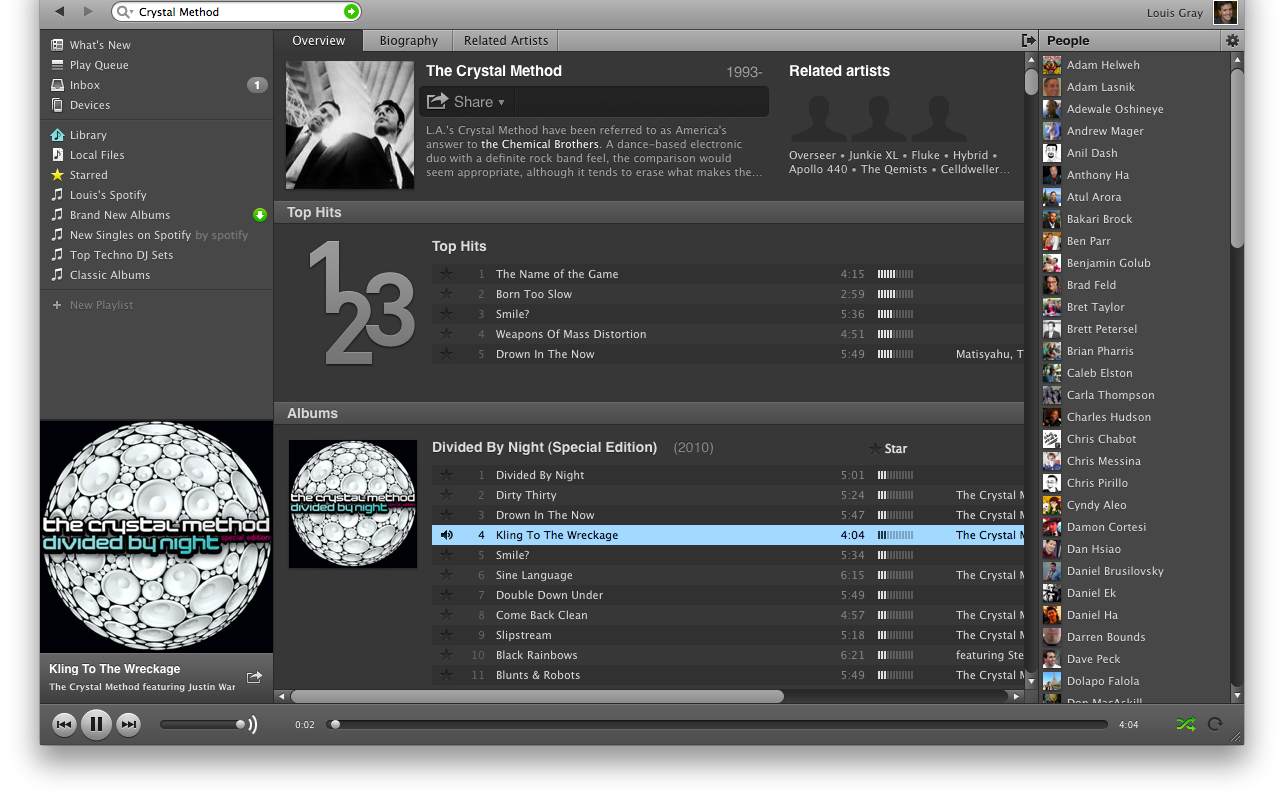
The Crystal Method playing on Spotify. Note the Scrollbar's Size for So Many Tracks!

Through the wait for Spotify's arrival, much attention was placed on the service's plan to continue with a free option for listeners, which scared the heck out of music labels. After much finagling, they landed a way to offer a free, entry price and premium price for the service. Considering premium is only $9.99 a month, it's a steal, period, and I'd expect serious conversions to the higher models. Spotify has also reportedly provided upwards of $60 million in music royalties to artists just in Europe alone in the previous year, putting them second highest behind iTunes. Add the USA to the mix and obvious virality thanks to social networking, and that number is bound to jump.

Pro Tip: Subscribe to the New Singles Playlist to Get New Stuff Immediately

As many skeptics have stated, Spotify does not enter greenfield territory, being flanked by Rdio, MOG and other streaming services, including the grandfather of the bunch, Rhapsody. The company's app is serviceable, but not beautiful, and music discovery could see some improvement. But that hasn't stopped practically everybody I know (myself included) from getting addicted to the service and using it with practical exception of all else. The flexible combination of downloads, streaming, playlists, sharing, and pure high quality sound sets Spotify apart from the rest, and you could see A-list artists as excited about the debut as we have been.

My Friend Charles Hudson's Profile on Spotify

As my invite URL link bounced around the social networks, emails started getting delivered late in the evening, and everybody who has been graced with a Spotify invite almost immediately sees the value and knows this changes their game. I am glad I haven't lost my purchased music converted from iTunes to Google Music, and love that GMusic is in the cloud, for Chromebooks' sake, but Spotify's got me in every other place. Sometimes, even after all the hype, things are better than expected or stated. With Spotify, this is one of those times. You owe it to yourself to try, if you've been locked out before. I am so glad I no longer look elitist with my early access. Go get it.

http://www.spotify.com/us/louisgray/

April 19, 2011

Sonos Launches on Android, and Adds AirPlay to iOS


Sonos, the company behind the futuristic wireless digital audio players throughout my house, announced the introduction of their long-awaited Android application this morning, bringing multi-room music management to the fast-growing mobile platform. In addition, the company also expanded its iOS offerings by adding support for AirPlay to its iTunes equivalent, enabling Apple fans to send audio from any AirPlay enabled app to Sonos speakers, including YouTube.


Playing a Song on Sonos and Flipping Through the Music Menu on Android


While it was no secret that Sonos had planned to launch on Android, having featured heavily in Google's Android booth at Mobile World Congress in Barcelona, the beta process for the Android app took a little longer than anticipated, thanks to some services' issues with buffering and ensuring a high quality experience over the expanding range of Android devices.


Grouping Zones on Sonos for Android


Since February, I have been using Sonos on my Android phone and Galaxy Tab to put all my favorite music on any room in the house whether it's just for me in the office, or in full Party Mode for guests throughout. As with its iOS equivalent, Sonos pulls from a wide array of musical sources, including Spotify, Last.fm, Sirius XM, Rdio and others. The sheer capability of demonstrating Spotify on Sonos, and showing people how I can get practically any song in the world, on demand, to any room in the house, has left people begging to have the capability themselves. Today's announcements brings that to even more tempted audiophiles.


Selecting a Song on Sirius XM or Spotify With Sonos


While I can't go as gaga as Robert Scoble over the future of AirPlay, sending audio from any playing music or video stream on the Web to Sonos speakers is another nifty trick. Imagine picking up a YouTube video, a streaming sports game, or simply an embedded MP3 on a Web site and kicking it out of your tinny laptop speakers, in exchange for full-featured Sonos. There's no reason you shouldn't always be using the best speakers in the house.

Android users can now go get, for the first time, the official Sonos build from the Android Market. iTunes users should watch for their devices to gain point upgrades later this morning.

January 28, 2011

Sonos Integrates With Rdio for More On Demand Streaming


Sonos' wireless Web-centric music players were my most favorite hardware gadget in 2010, bringing instant access to practically all music and other radio to any room in my home with fantastic quality. Forgoing physical media, Sonos has instead tapped into the world of streaming content, including Last.fm, Spotify, and Sirius integration, to name a few. Now, the company has embraced another increasingly popular up and coming music streaming service with social elements, Rdio - which is gaining visibility at a time when Spotify has seen delays in being opened up to full US use, open to only an elite few domestically.

Sonos Adds Rdio Support for Their Players

Sonos says their mission is "to connect you with all of the music on the planet", and adding Rdio, which delivers songs and artists on demand through integrated search and taps friends music collections and playlists to bring you more from the community, extends that reach significantly.

Rdio Displays Friends' Collections Next to Other Music Sources

Sonos has matched their great hardware offerings with simple and intuitive software for the desktop, iPhone and iPad. Adding Rdio as a service to my existing set up was very easy - simply requiring a single visit to the "More Music" menu on my Sonos Controller, adding my Rdio credentials and proceeding. After connection, Rdio slid in next to Spotify, Sirius and Last.fm, giving me yet another major source for streaming music.

Streaming Underworld on Sonos via Rdio

Integration with Rdio on Sonos is not available for free Rdio accounts, but instead requires a $9.99 a month Rdio Unlimited subscription (which I paid for - no freebies here). Rdio Unlimited promises unlimited Web access, mobile access and the option to sync to your mobile phone as well, so it's possible I'll be taking Rdio with me outside of Sonos if I'm on the go.

The Sonos announcement also comes with a 7-day free trial, so check that out here: http://www.rdio.com/Sonos/

Rdio Tracks My Music History via Sonos

Sonos is the best music hardware out there today - no hesitation in saying so - and their tie-ins with more sources like Rdio and Spotify are very smart. As for comparing Rdio and Spotify? That's no doubt another post. But if you've already got Sonos and you want to give Rdio a spin... the doors are open.

December 25, 2010

2010 In Hardware: Top Ten New Gadgets In Our Home

2010 has been a fantastic time to be a tech geek and gadgets fan. Led by the rise of tablets to give technophiles another item between a phone and a laptop to take with them constantly, and flamed by the fans of competition between Google's Android and Apple's iOS, the users are reaping the rewards.
We now expect to have always-on connections to high speed Internet. We expect to have access to all our data in the world from any device, and to be able to find practically any media and play it anywhere. With this backdrop, I'd like to briefly outline the top ten new devices that entered our world in 2010 in hardware, and why they made the list. The order may surprise you. Keep in mind that this reflects my personal experience and preference, and doesn't suggest one is any more "successful" than the rest in terms of sales or market penetration. Sometimes, as an early adopter geek, it makes sense to go a different way.

1) Sonos S5

The addition of the Sonos S5 wireless music system to our home has been transformative. I liked the first demo unit I received, that I purchased it, and later bought two more, when my family and I traded up our living space and finally had room to support excellent sound in every corner of the house. Now, I take it for granted that I can tap into my computer, my iPad, or any of my Android devices and pull down streaming radio, satellite radio, Last.fm or even Spotify.

The Sonos S5 sound and form factor is such a dramatic win that it has been the centerpiece of many gatherings with friends and family who marvel at how great the sound is and how fast I can get almost any song in the world, all managed from a mobile device. The addition of a Wireless Dock to support iPods or iPhones is a big boost too for those living in a world of iTunes.


2) MacBook Air

At the beginning of the year, I shed a few pounds, not from some New Year's Resolution, but from going down from a MacBook Pro to my MacBook Air. The Air is speedy, light and is the first step at moving to the cloud, almost by necessity, thanks to its 128 GB SSD disk, about half what the Pro offered. While the Air was a 2009 model, and is already out of date compared to the newest offerings from Cupertino, it is running great and goes everywhere with me.

3) Samsung Galaxy Tab

Regardless of Steve Jobs' comments, the 7 inch tablet form factor is impressive. I haven't fully written up my experience with the Galaxy Tab yet, but it brings the best of the world of Android in a design that fits simply in one hand - perfect for e-mail, photography, surfing the Web, Facebook, or reading books. It starts on the fly with full access to the Android Market, and actually fits in your jeans pocket, or inside jacket pocket. The device is actually very fast as well. It is inevitable to be compared to the iPad, which came first, and some may find it crazy to choose the Galaxy Tab over the iPad, but I've never really warmed up to the iPad, which is used much more by my kids than me. With the Air and Galaxy Tab, the iPad is essentially the odd one out.

4) Apple iPad

The iPad is going to be #1 on many different lists this year, from sales to innovation. For years, Apple was rumored to be working on a tablet device, and in 2010, it finally came, to tremendous success, just as the iMac and iPod and iPhone before it had. It replicated the iPod experience in a much larger screen, and is the go-to device for my toddlers. The sheer weight and bulk of the device made it less of a fit for me, especially when squeezed by the MacBook Air, but I'd be naive in saying the iPad didn't break open the market for tablets in a big way.


5) Samsung Epic 4G

Having caught the Android bug, and finally having found a phone network (Sprint) that didn't drop every other call (I'm looking at you, AT&T), I was excited by the great number of solid reviews of the Epic 4G, and its inclusion of a full-featured keyboard. The device runs all my Android apps, connects to all my email services in the cloud, takes great video and photos, and yes, lets me type very quickly when answering longer emails or chat sessions. The biggest major drawback I have with the Epic is its poor GPS support, which art times can be debilitating. Regardless of this, I am quite happy with the Epic.

6) Barnes and Noble NOOKColor

I recently wrote up my experience with the NOOKColor, which delivers a nice slim 7-inch Android tablet masquerading as an eReader. It's got smart integration with Barnes and Noble's book supermarket, and syncs with the NOOK app, so I can begin reading a book on one device and pick it up on a second. Added support to transfer my own music and rich media files via USB make it smarter than a dumb eReader and getting to the Web is a few clicks away. While it doesn't come with full Android Market, it has proven extensible, so I would watch this space closely.

7) Google Chrome CR-48 Notebook

Reviewing or ranking my experience with this 2010 device isn't really fair. Turns out I got it today. I have high expectations with the direction Google is taking with the ChromeOS and making our lives more cloud-centric. It's a big reason I started migrating to the Air in the first place at the beginning of the year. My initial impressions are as expected, with tight integration to the Chrome browser (essentially the full experience), a great thin frame and nice keyboard. The trackpad, pilloried by others, still needs some work. Putting a beta product on a pedestal against established innovative leaders like the MacBook Air is not fair, but I would bet that a mix of ChromeOS and Android features will lead to some interesting product pushes in 2011 and 2012 from these teams.

8) HTC Evo 4G

The Evo 4G I picked up at Google I/O this Spring was my first dive into the world of Android, and the way it performed against my aging iPhone 3G was remarkable - giving fast performance and real multitasking in a place I had never expected. The Evo's GPS and access to the Android Market made it very solid, and put me on a strong phone network for voice for the first time in years. The drawbacks to the Evo, including bulk and low battery life, mixed with the lack of a hardware keyboard had me switching to the Epic with no hard feelings.

9) Apple TV (2010 Edition)

Established Apple TV owners since the first 40 GB generation, the long-awaited development of the new Apple TV was well anticipated, and landed with a mixed experience. The machine is incredibly small and fast access to Netflix or streamed videos and TV is great, but the greatly reduced library was a disappointment. Truth be told, the best Netflix access in our home is actually with our Nintendo Wii, so the Apple TV only really gets use when we want a movie in the evening.

10) TyPad for iPad

With the launch of the iPad came the launch of iPad accessories. One of the more useful for me was the TyPad, which combined an elegant looking iPad case with a full-fledged bluetooth keyboard. If you're one to type out full e-mails on the iPad, the TyPad is very cool. The only downside is that once I had a keyboard, I found myself also reaching for a mouse or trackpad. Old habits die hard.

Christmas also brought a second NOOKColor into our home as I bought one for my wife, so now we have two iPads, two NOOKColor devices, and one Samsung Galaxy Tab, so we have 5 tablets to go with our three laptops (counting the CR-48). I am curious to see if 2011 will be as strong. But if you haven't checked out the Sonos S5, Galaxy Tab or are in the market for a new laptop, try out the Air or CR-48. Great stuff this year.

November 04, 2010

Sonos' Wireless Dock for iDevices: Simple and Sweet

The last year has forever changed the way I consume and enjoy music. The addition of Spotify to my life (and soon the rest of you in the US) made iTunes a vestigal program good only for synching iPad apps. The addition of Sonos leveraged the power of the Web to tap untold number of electronic music streams from around the world, wirelessly throughout the house. That's why I followed my initial test unit with the purchase of two more, and why my YouTube account is full of videos of my kids rocking out to great sound. Today, a small companion piece, a wireless dock for both iPod and iPhone, arrived in my home, and it makes getting music trapped on all those iDevices incredibly simple to get onto my Sonos. It's simple, small, and sounds great.

Thanks to an address mixup, my review wireless dock unit reached me today, a week or so after the true gadget blogs got their hands on the device. But that didn't make the experience any worse for the wear. After opening the envelope marked "Urgent", the device was streaming music from my iPod Touch to my Sonos players in five minutes or less.

The Sonos S5 systems I have in my home are notable for two primary things - there is no digital display, making the device appear as one big speaker, and also, no way to push physical media. No CD slot. No tape deck. No iPod Dock. The Wireless Dock for iPhone and iPod fills that gap, for the many Apple geeks who want to get music from their iTunes to the best speakers in the house.

Adding the Wireless Dock to Sonos, With AutoPlay in the Office

Setting up the device was truly simple. I plugged it in, added the component to my network using Sonos' desktop software, and it saw my iPod as a music source. Now, I can stream the content from this device (or any friends' devices they bring with them) just by plugging it in and selecting it from Sonos. There's still something magical about clicking pause or play on the computer and having it stop a device wirelessly, but Sonos gets it done. I can even control my iPod Touch with my Android phone using the Andronos software on the Android Market.


My Docked iPod Can Stream to My Sonos Speakers

The retail price for the wireless dock is $119, so it's not the cheapest peripheral ever, but it's a solid add-on for existing Sonos equipment owners, and the device is polished enough to have been made by Apple itself. To be honest, Sonos' hardware is some of the best designed gadgetry in the business, beautiful enough to sit in every major room in my house. That they also have access to all my best sound makes music to my ears.

Disclosure: I received the wireless dock from Sonos for free. I received my initial Sonos S5 unit free of cost as well, and have since purchased multiple devices. In theory, I should tell you I also have free access to Spotify Pro as well, but I'd pay for that too if given the chance. :)

September 02, 2010

Review: Spotify, Sonos Partner for Wireless Music Nirvana


With Spotify making seemingly infinite music available on every device on demand, as well as sharing my friend's playlists, through Facebook-connected social profiles, it's a rare time that I even open my old standby music library, iTunes, except when I need to plug in my iPad and sync up. I take Spotify with me in the car when I play music via Android on my HTC Evo. I have Spotify on my laptop, and yes, on the iPad. Until a few weeks ago, just about the only missing place I couldn't get Spotify was through the three Sonos S5 systems I have in my home. That the two services would eventually come together was a near certainty, as one has the most promising on demand music library in the world, and the other has the best setup for playing music sourced from the Web.


Three Sonos S5 Players, Linked, Featuring Spotify
(Screenshots from iPhone app on iPad)


A few weeks ago, before today's more official announcement, I got access to new firmware that updated all my Sonos S5 systems, bringing Spotify support, complete with playlist integration, and search. This combination means, if I want, I can group together these systems, from the family room to the living room, and my upstairs office, have all of them playing the same music, and I can pull practically any music out of thin air.

Pulling ABBA from Spotify on Sonos


Search for a track on Spotify, or an artist or an album, and hit "Play Now" or "Add it to the Queue" and the music in the cloud becomes the music in your home - wherever you have speakers, be they small, on your phone or computer, or larger, now embedded in Sonos.

Searching Depeche Mode on Spotify Via Sonos

Demoing Spotify and Sonos connectivity wirelessly on the iPad is almost like magic - with a futuristic feel whereby I can, with a few taps, summon any song from any era and have it filling my house with music. A swipe to the right, and my entire home rises in volume, all players at once, turning an otherwise domestic venue into an understated dance club, with the sound echoing from room to room.


Playing Spotify Playlists and Searching Underworld On Sonos


After the quick firmware update to my Sonos machines, all linked together by a Sonos SoundBridge attached to my wireless network, Spotify was added as a service to each device, adding on to previous support for Internet radio, terrestrial radio, localized stations, satellite radio through Sirius XM and also Last.fm. I didn't have to update every single application, but every Sonos app, from the iPad to my desktop, could see Spotify supported.

As existing Sonos owners know, one of the more futuristic bits about owning one of the company's S5 players is the complete lack of physical media. The devices feature simple up/down volume buttons and a mute button atop the unit, looking more like a speaker than central music hub. There's no spot for CDs, no radio dial, no vestigal digital clock, and clearly no cassette deck. Just pure music and attention to serious aural detail. Bringing Spotify to this physical media free wonderland just makes sense.


Searching for New Tracks on Spotify And Adding to My Queue


For those, like me, who own multiple Sonos devices, you can also set different players to feature different songs at the same time, should that strike your fancy. You can play rock and roll upstairs and lounge music downstairs. Similarly, you can tap into Spotify to point that music library toward different devices. One source, but two musical streams at the same time.

Spotify only acknowledged the partnership with Sonos a few hours ago, and for most people in the US, waiting for Spotify to launch officially in this country is still a dream, but for those of us who have gotten early access, thanks to generosity from the company's head of special projects, Shakil Khan, whom I interviewed at LeWeb 2009, we're already living the digital dream. It works, and the combination of the two offerings is amazing. It's no wonder I'm not buying music from iTunes at all.