Showing posts with label Google. Show all posts

January 18, 2018

With Web at the Core, Chromebook Options are Strong, Plentiful

This looks like an ad. But it's just a few recent Chromebooks.

In 2011, on my first day at Google, I was asked to pick out a laptop. The choices were slim - a thin Apple MacBook Air or the larger MacBook Pro, a forgettable Windows equivalent, or a Linux device more suitable for engineers. While I had the company's first foray into Chromebooks, the CR-48, at home, in addition to my own personal Mac, picking a Chromebook wasn't even an option. The Web-centric OS, which focused on keeping all data in the cloud, and leveraging Web apps, wasn't ready for my every day use.

A few months later, I ran into then SVP of Chrome Sundar Pichai, in the office stairwell as we were on to our respective meetings. Pointing to my MacBook Air, I told him I couldn't wait to turn it in and go completely ChromeOS at home and at the office. In his usual humble and understated way, he said the team was working on it, and to stay tuned. Not too long afterward, in another unplanned hallway conversation, he introduced me to a VP on his team developing hardware, and offered me up as a willing beta candidate.

The 2013 Chromebook Pixel (version 1)
I didn't think much of the choice encounter until early 2013, when I saw Sundar take the stage and unveil the Chromebook Pixel, a high-end Chromebook with a touchscreen, and promised faster speeds and memory.

As I recounted a few years ago on Google+, I saw Sundar as available on IM shortly after the event and congratulated him on the exciting launch. His IM came moments later... "Do you have one yet?" Surprised, I said I didn't, and it was no big deal. I had no such illusions of self-importance. But he answered directly, "I'm so sorry. You were supposed to be on the list." Fast forward, less than an hour later, I had a brand-new Pixel - and I haven't seen a need to use a Mac since.

That a Googler is using a Chromebook isn't newsworthy, obviously. Water is wet. But I remember a time when betting on a Web-centric device like a Chromebook was a real leap of faith. There were always excuses not to make the switch, be it a specific piece of software, some concern about printing, or general distrust of the unknown. Maybe we were worried about moving local storage to the cloud, or editing photos, or losing access to some premium software on Mac or Windows we'd already paid for - often at a cost even higher than a new machine.

Chromebooks have proven exceptionally popular in schools, thanks to their versatility and low cost. And as people become more mobile-centric, their data also becomes more portable and Web centric. Just as you expect to have your data follow you from phone to phone, moving from device to device should be seamless. Like I'd said in 2012, the future of local storage is practically none at all.

This summer, I got my wife a touchscreen convertible Chromebook for less than $100.

Watching the many different options for Chromebook hit the markets feels a lot like the same momentum we saw when Android's many partners took imaginative approaches to new handsets. While we essentially knew the rigid details coming from Cupertino for both computers and phones, Google partners built big and small and with any number of differences to set each apart, from brands as diverse as Acer, Asus, Dell, HP, Lenovo, Samsung and Toshiba.

Now the decision process is one of plenty, not scarcity. So many options, pretty much all of them good. You can get small screens or big screens. You can get touchscreens and convertibles that act like a tablet. You can run Android apps, or even mark up the screen with a digital pen. All very cool.

This summer, while on a family vacation in Chicago, after seeing so many positive reviews for Samsung's Chromebook Pro, I figured it was time for an upgrade from my two year old Acer 710. I quickly bought one on Amazon, had it delivered to an Amazon Locker down the street the next day, and after entering my Google credentials, I had made an incredible upgrade, with no data migration needed. It was almost too easy. (And yes, that's the laptop I'm on now)

Having seen the Pixelbook, the successor to that 2013 Pixel and its 2015 follow-on, and even more good reviews, I'm already getting that itchy feeling and have added the newest device to my shopping cart more than half a dozen times, desperately wanting it, but knowing the Chromebook Pro has a long life left.

Meanwhile, my wife's slim Asus Chromebook I picked up this July gets constant use, and my 9 year old twins bang away on inexpensive Acers to do work in Google Docs. They do the work of machines that cost 10 times as much, without coming bundled with the worry that you lose your data in the event of a disk failure. And the gaps that may once have been there in 2010, 2011 or 2012... they're gone.

If you're an elite creative software wizard who has a custom setup, then keep it up, but for the rest of us who use our devices to create, engage, consume and share, the Web is the most powerful device there is, and Chromebooks were designed for it. They've come a long way.

Disclosures: I work at Google. You knew that. But I still pay for my Chromebooks, except for those provided for me to use at work, obviously.

January 10, 2018

Linking Less and Talking More: Disappearing Web Mentions


The World Wide Web was designed to primarily do three things - inform, discover and connect. A globally connected series of documents could instantly bring you to the thoughts and experiences of someone across the world. In the earliest designs of the Web, it was through hyperlinks that you would find those new voices. Links brought you new sources of data, and those downstream documents led you even further to new people and ideas.

As the Web evolved, and incorporated photos, videos, streaming, and all manner of media, discovery expanded to include search. Without an explicit link, you could still find pointers to new content in the results of your query. Destination sites, acting as content hubs, would surface new content, usually within their network, of recommendations you might like. Ads, essentially links with pretty pictures, would offer another exit.

WebCrawler: One of the Web's first search engines
When blogging was the main medium of first person information sharing, prior to the rise and later domination of real time social streams, the way we discovered new voices was through links to others. I'd mention those I agreed with and highlight, with more links, those I didn't. One popular feature in practically everyone's sidebar was a blogroll, to show those with closest ties or just who we liked to read. And there were custom search engines, like Technorati, which when combined with tools like Google Alerts, could let you know when somebody mentioned you on the Web.

Technorati: The original blog and link search engine
But over time, a number of things happened to chop away at this fluffy cloud of friendly discovery.

1. Many Blogs Gravitated Toward Internal Linking, Not External Linking
The big sites realized that keeping visitors on their own site was more profitable and aided their metrics more than sending them away did. And while there is obvious irony in my posting to my own discussions on this from the past, we actually had lengthy discussions about these internal linking practices in 2007 (Part two and part three
Arguments a decade ago in favor of internal linking were that site visitors were familiar with companies and topics discussed, and could see previous coverage by their publication to learn more if they weren't. And any link off site started feeding the ad revenues of a potential competitor.
2. Dedicated Blog Search Sites Didn't Graduate to Quality Businesses
Technorati was a specialized blog search engine that skipped the general Web and went directly to blogs for its content. Its leaderboard of bloggers was closely watched, as were trending topics on the site that led to see what the blogosphere was discussing. But it was seemingly always in financial trouble, and has pivoted beyond recognition to whatever it is now.  
A 2010 interview I had with the company's leadership team claimed a pivot to quality, but their CEO was gone a year later, and so are pretty much all the discovery tools that initially aided me to find some of the best voices of the Web 2.0 era. And yes, Google Blog Search quietly disappeared not too long afterward.
3. Blog Discussions Pivoted to Real Time Streams and Sharing
As I noted in 2009 (yet another internal link, am I right?), linking between communities was declining in favor of retweets on Twitter or sharing into the stream. The microburst of a little site traffic would provide that one time dopamine hit, but not leave a trail for later web spiders to find.
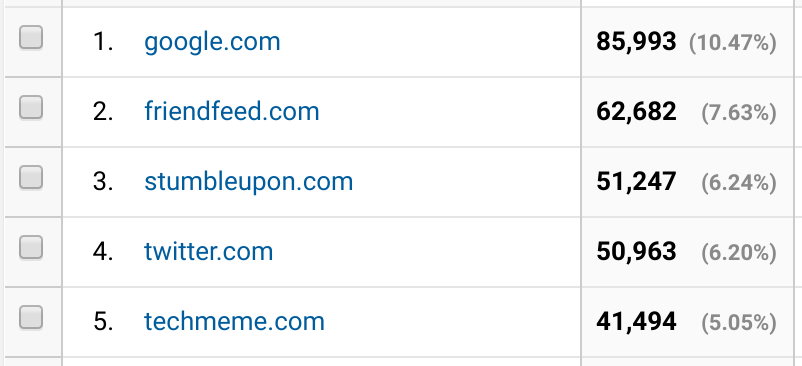
My top referring sites, via Google Analytics, from previous years

As the social streams of Twitter and Facebook took over, and bloggers (me too) got distracted, the share became the canonical mention. Your mentions on Twitter, or your notification of shares on Facebook, were faster delivered and easily quantifiable. And individual profile owners are quite unlike the publishers looking to deep dive into their analytics to discern where traffic came from.

Today, Brent Simmons laments the result of all the mentions going to the streams and leaving the Web. With links decreasing, and blog search being a relic, he yearns for a way to find again how his business is mentioned on the web or when he is being linked to. Joe Gregorio, like me, wistfully remembers analysis of referral logs to find how people found you... all through links.

Simmons' proposal is a limited one, keeping it to the MacOS/iOS community. A small project like that shouldn't be too challenging, but it speaks to a bigger problem, where the connections we once demanded are an afterthought behind the latest viral tweet and trending Facebook share. Streams are ephemeral, but the Web was built to last. It'd be great to see new voices building, informing and connecting again.

Disclosures: I work at Google and am on the Google Analytics product. So I think about publisher tools and visitor stats more than most.

January 04, 2018

A Decade of Silos Has Throttled Open Content Distribution

The 2018 Social Media Flow is Driven by Content Silos

In the ten-plus years since I started this blog, one of the clearest trends on the Web has been for destination sites to want to control the user session and experience. In parallel, sites focused on aggregating content from external sites or highlighting the best of the web - serving as a filtered pass through, have struggled. Many are gone.

While significant efforts were made during the forging of Web 2.0 to drive open standards and allow for data to flow from one site to another, through RSS, Pubsubhubbub, Atom, XMPP, or whatever your preference, 2018 on the social web is a much more challenging place to write once and publish everywhere.

As I view the publishing space, I often turn to four big challenges that have to be solved for a platform to be a success to both authors and readers:

1. Creation

A platform, be it for photos (Instagram, Flickr, Google Photos, etc.), short updates (Twitter), long form (Medium, Blogger, WordPress, etc.), video (YouTube) or a mishmash of all (Facebook, Google+, etc.), needs to make it easy for the content creator to share what they want, in the form they want, and have the output be what they intended. This is true whether we are talking about desktop or mobile creation.

2. Distribution

Once the content is created, it has to be sent somewhere. If you write a post and hit publish, how do people find it? Is it sent to a third party network where they are hanging out? Is it sent by email? Do they get a notification on their phone? Does it flow down their timeline, as they have new items to consume? Or is it just another flat file, waiting to be indexed by Google and other search engines?


3. Discovery

Readers want to find new content. They seek relevance, freshness, and community. This mirrors the three pillars of social sites I highlighted back in 2009, and echoes that readers want intriguing views that mirror their own preferences. Like I'd predicted in 2006, the Web has become a divided place, where we all flock to our groups of like minded people, and disavow opposing views, but we still are eager to find more who reinforce our position. We still crave new friends and stories and we want to find them quickly.

So how good a job do these apps and sites do of surfacing new people and ideas? Do they have an aggregated site with highlights and popular people or posts? Is there a place to find more obscure viewpoints and new voices?

4. Consumption

Since the smartphone revolution, kicked off by Blackberry and the iPhone and now led by Android, more people are constantly connected and reading news from their mobile devices. In many countries, the mobile device is the only window to the Web. Does the content flow well for mobile consumption and new ways to navigate from screen to screen, update to update? Or is it best suited for a leanback tablet experience or for the desktop?

What typically happens with content platforms is the content fills the available container. Twitter is a clear 140 or 280 characters. Social hubs like Facebook and Google+ favor large photos and a short introduction. Instagram is all about the photo with a small description. Blogger and WordPress and Medium are as long as you want to go. One has to consider if users and screens keep up.

2009's promise of sharing everywhere wasn't meant to be.

We've Come a Long Way from Aggregating Streams and Sharing the Web

As content started to be created in a wide array of social sites, aggregation services like FriendFeed helped bring people's streams together. Bookmark services like Delicious helped people save the highlights from the Web and amplify the world's favorites. Users voted up posts from Digg and passed them along with StumbleUpon. The most voracious consumers lived in Google Reader and didn't miss a single post from the RSS feeds they were subscribed to.

It was too good to last.

The largest social platforms were not content in simply being links to external sites. Facebook focused more on original content shared on the platform, with less priority given to send traffic off site. Google Reader shut down, and while Feedly and others stepped up, the world of RSS never recovered. Delicious died. Digg is a shadow of itself. FriendFeed was obliterated. LinkRiver closed. Socialmedian closed.

In the wake of all these gateways' demise, taking content from the open Web and getting it in front of new viewers is more challenging. While I've always said you need to be where the users are and can't force them to come to you, what could be automated is now requiring manual intervention at practically every step.

Just What Am I Talking About?

The alpha and omega, yin and yang of social outlets (for text, anyway) are Facebook and Twitter. Facebook is much bigger and much more profitable, but don't get distracted. People creating content for the Web also need to make sure that content fares well downstream on Facebook and Twitter. You can write it for the open Web, but you then have to take explicit action to share the content downstream - or set up automation to either site, usually backed by RSS. At that point, whether you get discovered or not is up to each site's algorithm, which has leaned more in favor of implied interest rather than chronology of late - meaning you can see viral content from hours or days ago before you get the newest stuff.

On a mobile phone, notifications are the holy grail of getting someone's attention. (See: Life by Numbers and Notifications from 2014) It's not uncommon to get notified when someone tweets, but it's very uncommon to ask for a notification when a site makes a post.

In parallel, the feedback loop from such networks, as well as Instagram or others, is near instant and acts as an incentive for the author to initiate their content on that silo natively. Post a 20-tweet storm to Twitter, and immediately start seeing those likes and retweets roll in. Post a story to Facebook and wait for the Likes and comments. Post a news story or a blog post, and ... wait. Wait for visitors in Google Analytics? Wait for the post to be shared downstream? Wait for the story to be indexed in Google News and search?

The elimination of Google Reader, FriendFeed, and Digg as amplifiers of Web content, alongside the attention absorption by Facebook and Twitter makes it harder for Web authors to get visibility - and they they aren't dropping their content into the real time stream.

So What Does the New Flow Look Like?


In 2009, it seemed pretty easy to me. Post on the blog. RSS would take it to FriendFeed and Google Reader. FriendFeed would post to Twitter. Twitter would post to Facebook. Then I'd run around and answer comments wherever they were distributed. (More on distributed conversations from 2009)

Now, I can still post on the blog. And the RSS link is the same. I even get the small bump of engagement on Google+ from the blog's page automatically adding my content there. But then, to make sure I cover all my bases, I then make another share of the same content to Medium, for those who love their site, and I've even found good engagement on LinkedIn, by making a third post of the same content on their channel. It's a different audience, but, if on topic, they share and engage.

So that's three posts. Meanwhile, I still have to share the story on Facebook and Twitter separately, hoping that someone will break their consumption flow and engage on my content downstream.

It feels like more work to get less return. And yes, I recognize that some may not miss FriendFeed because they never used it. Maybe others think Digg got replaced outright by Reddit, and gains similar traffic. Others prefer Hacker News. So aggregators do exist, obviously, but hubs aimed at surfacing new content, as opposed to highlight content on the site and keeping readers there, have declined.

To properly make the Web as desirable and viable a platform for publishing, we need to work together to fix the distribution and discovery gaps, make content fantastic on mobile for creation and consumption, and allow for engagement that is as simple as a Like. I applaud (there's the joke) Medium's approach to reward users with claps, for at least they're trying something. We should all be trying.

Disclosures: Yes, I work at Google. Sometimes, I help the Blogger team. I used to work on Google+ and have many friends on those teams still. I miss Google Reader every day. FriendFeed too.

January 03, 2018

How a Google Home in Every Room Gives My Kids Answers All Day


Some time last year, we installed five Google Home units in our house. One was placed in the master bedroom. One each went in both our kids' rooms, as well as one in the office, and one downstairs in the kitchen. Knowing that asking Google any question was just a simple request away, I was eager to see how the family would adjust to having a friendly assistant ready at any time to go fetch answers. What I've seen is that the devices are used throughout the day, and, often, the kids talk to Google before they talk to me.

OK Google, tell me a joke.

The morning starts with Google Homes sounding the alarm to wake up.

As the kids mumble "OK Google, stop", we have momentary quiet, until they shuffle out of bed and ask Google what the weather is going to be that morning. Obviously, depending on Google's answer, this can mean wearing shorts or jeans, long sleeve shirts or short sleeves. If the answer isn't detailed enough, I've heard the kids ask a second time, asking for the high of the day, which could impact how they prepare for PE at school, or if it's going to rain, and they need to pack an umbrella.

One example from our Assistant history.

As the morning routine begins, the first person downstairs gets to be the DJ, asking Google to play a song, which serves as the background music for breakfast. If the song isn't what they wanted, they simply say, "OK Google. Next song." until one they would prefer comes on.


If it's a weekday, we're most likely off to school and work, and we're all out the door. But if not, we probably have another query to Google Home to see how bad traffic is wherever we are going, how long will it take to get there - or sometimes, how the weather will be at our destination.


When the kids get home from school, Google does more than just act as background music device. My 9 year old twins use the Google Homes to confirm math homework answers to see if they are right, or ask it to sub in if an equation is too hard, or if they are unsure of spelling. The Google Assistant is the parent who is always willing to give an answer and never gets tired. 

With the expectation that Google has all the answers, the type of questions can be fast and furious. "What is hypoglycemia?" "Are hedgehogs nocturnal?" "What state is Boston in?" "What time is it in Sydney, Australia?" "What does salutation mean?" "What day is Black Friday?" "What time is it sunset?"

If Google doesn't know, or says, "Sorry. I can't help with that yet. But I'm still learning!", it's usually followed with sighs of exasperation and amusement, as they follow on with a different query more likely to get an answer.

The most popular question asked of Google Home this last year? By far, a simple one. "What time is it?", followed by "how much time is left on the timer?" for those ever important assigned times when they need to be reading, or when kids are taking turns with a game or a device, and need to hand it off to another child.

How many more minutes are left on my timer?

As homework time wraps up, and the kids find themselves on leisure, as dinner is eaten, and things are tidied up, I can hear them play music in each room as they have access to the world's artists on demand. "OK Google, turn your volume to 50 percent." "OK Google, play Katy Perry."

Do they always get the question perfectly right? No. But the device tries its best to guess and provide the answer - or pushes for another try. "Sorry. I don't understand?" or "Try again in a few seconds."

As bedtime approaches, everyone asks Google to set an alarm for the next day to start the process anew. And yes, if you're wondering, we do disable the devices in the kids' rooms by 9 p.m., so they don't end up rocking out in the wee hours. If they want something so badly they need to ask that late, they can ask me.

Set an alarm and call it a day.

The Google Home devices were such a benefit to our house that they were the go-to gift this last Christmas. Given they were only $29 apiece on the Google Store, I maxed out the order of ten, and shipped them in many directions - to family, to friends and even to neighbors, as they too could see the benefit of a smart assistant that takes the kids' tough homework questions on without complaint, and is more than happy to let you know if it's going to rain.

Just like touchscreens and tablets were so easily made a part of our family's life, from the very first iPads, and through the Nexus line, adding voice-activated devices has been simple and the children don't find them daunting at all. After all, who wants to get a laptop out and type in a query?

Disclosures: I work at Google, obviously. I paid full retail for my devices.


February 09, 2016

Running a Social Fantasy Stock Portfolio With Google Finance


It’s no secret the stock market has been more than a little bit rough this year. After years of growth and optimistic enthusiasm about Internet giants, promising biotech pioneers who aimed to change the world, and starry eyed hope for unprofitable unicorns, 2016 has seen record setting declines through January, with the average company losing double digit percentages in value, and less fortunate market caps slashed by more than half in less time than Noah and his family were said to have spent on an ark.

But amid the daily headlines screaming with bold red letters, the overnight alerts about instability in China, and debate over whether the low price of oil will halt the rise of the electric car, a few friends of mine and I have been running a parallel stock game of sorts which makes the daily punishments of whiplash just a little more acceptable, and maybe even fun.


When the leader is down 13%, you know it’s been a rough year already.

The starting rules sounded simple: Start with a virtual $100,000 (any number works, but $100k sounds big) Pick ten stocks or commodities Invest $10k in each one, either short or long. Hold those picks for a full year. No trading. After a full year, the person with the greatest balance wins.


We all started with 100k, but we’d all beg to get there now.

The rules, especially the counterproductive block on any mid-year trading or selling, seem simple. And the twelve month horizon may have you believe it’s a set it and forget it game — just plug in the tickers and come back to see how you did. But the reality is far different. Six different people with different backgrounds, who claim to know what they’re doing and have more than an average level of experience in the market, each delivered widely differing picks, and now we’re keeping an eye on sixty different securities, watching how they move in the face of some pretty strong headwinds.

One portfolio bet 10 for 10 on small cap biotech stocks, crossing fingers for a binary spike on approvals from the FDA, but has had absolutely no luck, down more than 40 percent on the year already — needing a near double to get back to par. Others of us picked large cap tech leaders like Google, Facebook, Netflix, Apple and Amazon, and have also seen declines around 20%. Solar picks like SolarCity, SunEdison and SunRun? Down 33%. One contrarian portfolio is hoping for turnarounds from Yahoo!, HP, Chipotle and Yelp! and faring no better. Pretty much the only things that have kept above water in 2016 are retail picks like Macy’s and Walmart, old media like Time Warner, and a few opportunistic shorts.

(Disclosures: I work at Google and also own SunRun stock in real life. No other biases are assumed or intended.)

The Contrarian Account is Down Too

That none of us predicted a market correction makes us seem more than a little daft, but even though we’ve managed to take $600,000 and turn it into just over $450,000 in about a month’s time, the daily ups and downs and charts created by the automated spreadsheet have turned what should be a tragedy into a thrilling contest that plays out five days a week.

How Google Finance and Google Sheets Run This Game

Stock portfolios are typically a secure and individual endeavor. They’re not made for other people viewing, and they’re not social. But when my dad wagered I couldn’t invest his money better than the 3.5% annual return he expected from a money market account in 2014, I had to find a way to prove I could. And I happened upon Google Finance’s integration with Google Sheets — plugging in my own ten picks that summer, and eventually delivering 10% or so gains on the year. That experience had me getting deeper into Google Finance calls, dabbling with App Script, and setting up the game we have today.

Step 0: Make your picks.

For this game, I set an arbitrary date of January 1st, 2016, and had all participants enter their selections before market trading on the New Year, so that when the market opened, we were good to go.


Start with 10 tickers and then let Google Finance do all the work in Sheets.

Step 1: Get the prices for your picks.

Google Sheets supports calls to Google Finance that request the stock ticker, and then a number of variables, like “Price”, “High”, “EPS”, “low52” for the yearly lows, etc. (see https://support.google.com/docs/answer/3093281) For example: =GOOGLEFINANCE(“AAPL”, “price”) would return the price for Apple stock. Paste that into the cell and change the ticker for your stock.

Step 2: Determine how many shares each player has per ticker.

We determined $10,000 per ticker, and divided the shares by the opening price on January first. A simple spreadsheet call did the math for us.

Step 3: Show the daily change in each ticker and portfolio.

The call of =GOOGLEFINANCE(“GRPN”, “changepct”)/100 would show how much Groupon stock has gone up or down by percent each day. That percentage change, against the total value of your shares at the end of the previous day, would deliver the Daily Impact from that ticker. Add up all ten, and you have the daily change by portfolio.

Step 4: Create background sheets to run a scoreboard.

Now that all the tickers are constantly getting data from Google Finance, and showing the ups and downs each day and over the long term, you can set up three distinct hidden sheets. These sound complicated, but you only have to do it once.

4.1 ) The Master Data sheet. This sheet tracks every ticker in every portfolio and captures their current value. This is done by making calls to each person’s portfolio and the respective cells, like share count, price and gains.


You only have to put these formulas in once, and they’re not really that complicated.

4.2) The All Time script sheet and Daily Script sheets. These are more fancy, as they take data from the Master Data sheet, and auto sort by the most valuable stock pick, displayed it in descending order. This is done using Google Apps Script, with one of these commands: =SORT(‘Master Data’!A2:L41, 8, FALSE) to get all time data =SORT(‘Master Data’!A2:L41, 9, FALSE) to get daily change data That looks crazy, but what you’re doing is making a call to the Master Data sheet, saying you’re looking at all 40 rows from 2 to 41, and all columns from A to L, then ranking by the 8th column, which is the overall gains column, or the 9th, which is today’s change. These sheets make the game more fun.

4.3) The Leaderboard sheet. This small sheet tracks the current values of each players’ portfolios, and how much they’ve gained — both since the beginning of the game, and today.

Step 5: Get As Creative as You Want

Once you have every player’s portfolio being tracked in near real-time through the day, you can do practically anything you like with the data.


The day’s action on a red day shows 10 stocks up and 50 down.

We set up a front page which highlights the current leaderboard, from top to bottom, and shows which stocks have done the best all time or each day. And for those who love to watch the CNBC ticker, we set up another page called “Today”, which captures the day’s action, including our total gains or losses on the day, and an eyeball look at how many tickers are up or down on the session.


Fun charts bring color and tell the story as the market runs.

We also set up a page dedicated for charts, to capture how we’re doing each month on the game — which requires some manual work on the last day of each month, but is trivial, and compares each player to another, showing how much we each need to improve to move up the ladder to the next slot.

And on each portfolio page, we got creative with the Finance API and made calls to 52 week highs, lows and how far each ticker is doing from the annual peak.

What Could Go Wrong?

With Google Finance doing all the calls in the background, and the tickers never changing, the game doesn’t need a lot of maintenance from the project owner — aside from the monthly data captures, and any new features you come up with. But the stock market is a tricky place, and you have to watch for complications.

What if a company gets bought or goes private?

Our answer has been that if a company gets purchased, we would ‘pay out’ the holder as if they owned real stock. An all cash transaction would pay out at the value of the deal, while a stock transaction would get equivalent stock of the acquirer. If a company goes private, the stock value is frozen at the last day it was traded.

What if a stock splits?

That’s a fairly easy one, actually, if you see it. For example, if Amazon is at $500 a share, and you have 20 shares, and it splits 5:1, you’d give the current holder 100 shares at $100 a share, and adjust the acquisition price to a fifth of the original.

What if a ticker changes?

That’s annoying, but we already encountered that with Broadcom getting acquired by Avago Technologies. The calls to $BRCM no longer worked. I tracked down the acquisition details, swapped out the calls to $BRCM in exchange for $AVGO and made sure the dollars matched.

What about dividends?

Look. This is a game, so no dividends for you. Sorry.

What about index funds and options?

Index funds are great if you’re trying to be safe, but games are about risk. And options are too tricky to set up, so no. Sorry.

I did the hard work of getting started. Here’s your template.

Practically all the Google Finance calls from Google Sheets can be found on this help center page: https://support.google.com/docs/answer/3093281. I leaned on Reddit a bit to find out how to pull in data on Bitcoin, and asked my colleague Steven Bazyl some App Script questions when I was getting started. But now I have a template that runs itself. If you want to paper trade by yourself or with some friends, you can absolutely take our template, and put in your own picks. And just maybe the market will turn around and we can talk about gains instead of losses!

Here you go: https://goo.gl/YdTalj Have fun and good luck!

July 30, 2015

Tech Company Shifts Position Sunnyvale as Major Hub for Next Decade

In Silicon Valley, some of the most prosperous cities and most sought after zip codes to live, raise a family and send kids to school, are directly dependent on the proximity to corporate headquarters of the leading technology companies. As some of the biggest companies are running out of room in their headquarter cities, the resulting demand for continued growth is putting pressure on neighboring communities. Sunnyvale looks like ground zero for this next wave.

Cupertino, home to Apple, the most valuable company on the planet, has a median home price north of $1.7 million dollars, up 15% year over year. Mountain View, home to Google, has a median home price above $1.3 million, up 20% year over year. And these high marks significantly trail the more upscale suburban locales such as Palo Alto ($2.44 million average) and Los Altos ($2.65 million average). Quietly sitting wedged between Mountain View and Cupertino, in a state of tug of war between Apple, Google and more companies, like Yahoo!, LinkedIn and NetApp, is Sunnyvale ($1.28 million average). Sunnyvale has not only seen the fastest increase in average home prices over the last 12 months, but is set up to see even more demand as jobs flow to the city. As a biased Sunnyvale homeowner and area employee, this is very interesting to watch.

Bay Area Housing Prices: High and Increasing

As the total land available to new workers entering the area or existing employees looking to leave apartments and find a home near their office stays static, the old rules of supply and demand are taking hold. Sunnyvale home prices are up 23% year over year, at a pace slightly above the surrounding neighborhoods, higher than the aforementioned Cupertino, Palo Alto, Mountain View and Los Altos, but even quicker than Facebook's home, Menlo Park (up 17% y/y), or San Francisco, home to Twitter and many others (up 13% y/y).

Sunnyvale's Average Increase Highest Over the Last 12 Months

So why is this? And who cares? As somebody who has been working in the Valley since the rise and fall of the first dotcom boom in the late 1990s, I've seen ebbs and flows in the economy impact hiring, funding, area traffic and housing prices. Big names that once were major land owners and employers, like Sun Microsystems and SGI, can virtually disappear. But when large companies present stability and prosperity, they can be a magnet for skilled workers. And in the last two years, you have seen major announcements from Valley leaders, like Google, Apple and LinkedIn, announcing new campuses or building into Sunnyvale, as offices in neighboring Mountain View and Cupertino become saturated.

While much press has been spilt over Apple's amazing spaceship campus under construction in Cupertino, what few note is that this work, taking over an older Hewlett Packard lot, is snugly cornered on the border of Sunnyvale city limits, and the company has been snapping up buildings all over the city to manage growth. LinkedIn has been building sparkling new buildings in downtown Sunnyvale and looks poised to move thousands of workers there soon. Google has made headlines as they've taken over buildings from Juniper Networks and even took over nearby Moffet Field.

This expanded pressure from Cupertino on the South border, and Mountain View to the West and North, is pushing Sunnyvale costs and demand upward, much like new mountain ranges are formed under pressure from moving tectonic plates. And this isn't to say that Sunnyvale doesn't already have significant employment hubs of their own. The city's largest employers include Lockheed Martin, Northrop Grumman, Synopsys, Broadcom, Infinera, Nokia, and and many of those I've already mentioned, like NetApp, Juniper and Yahoo!. But the new occupants in the city come armed with significant war chests and momentum, almost certainly strong enough to ward off any turndown in the hot tech economy or an eventual recession.

The stats are Sunnyvale are fairly pedestrian as Bay Area cities go. The last census reported just shy of 150,000 residents, and a workforce of nearly 120,000. The city has adapted to economic shifts, from agriculture to defense to microprocessing through Silicon Valley's first wave, and now, the Internet. With Google bordered to the East by water and marshlands, and Apple by rolling hills of past Highway 280, the growth point is aiming straight at Sunnyvale. Watch this space.

Disclosures: I work at Google, and live in Sunnyvale.

February 23, 2015

YouTube Kids: Smart, Mobile First, and Child Sized.


In December, I wrote about viewing technology through the eyes of a child. As much as I think of myself as an early adopter and 'with it' net citizen, I'm equally amused and amazed at the activities my own kids rapidly learn and partake in when it comes to technology and the Web, how things and concepts once considered the future are commonplace. And their eyes, unvarnished by the way things have always been, highlight shortcomings in our software and websites that historically have been designed for fully literate adults on the desktop.

I've been particularly excited to watch (and trial) YouTube Kids as it has been developed, and have been eager to see it launch today, the collective effort of sharp colleagues like +Shimrit Ben-Yair+Pavni Diwanji+Jonathan Terleski and many more. As they wrote in today's blog post, the new YouTube Kids is "the first Google product built from the ground up with little ones in mind." As a dad of three kids six and under, two of whom who read fairly well and a third just trying to keep up, it's exciting to see them become the focal point for an entirely new interface.

The YouTube Kids Music channel.

My children, from a young age, have been surrounded by touch-enabled tablets. They expect my laptop (and in the case of my Chromebook Pixel, accurately) to be touch-enabled. They use voice search constantly to find what they're looking for, and they essentially expect the world's content to be immediately available. But they tire quickly when apps and sites don't do what they want. That can result in complaints to me, or even a thrown tablet or two from a tantrum.

Without sounding too much like PR-speak, from my own experience, I've seen the YouTube Kids app to reduce any surprises from me in terms of what my kids are watching, they more easily navigate the app, find channels and shows they want, and generally are pleased to have something made just for them.

Browsing shows on YouTube Kids

If you haven't yet tried it out (download on Google Play or iTunes), the app features curated channels, a music area, a learning section, exploration, and the always handy search button. So the colors are bright, the buttons are bigger, and there's no noise in the way.

Browsing the PBS KIDS channel on YouTube Kids

The true measure of whether an app for kids is working is whether the kids ask for it by name, or keep using it instead of getting bored and trying something else. My four year old boy is quick to use the app on my Nexus 9 or Nexus 6, and the twin six year olds are quickly getting used to the new app after lots of their own experience on the standard YouTube app we've all used.

Searching for Minecraft on YouTube Kids

Lucky for us parents who do our best to stay on top of their digital explorations without trying to be overbearing, YouTube Kids makes searching less of a risk. My kids won't go from a G rated topic to an R rated one in a few clicks. Searching for Minecraft (which happens in my house) turns up solid results. And I can even set up the app to run for a certain amount of time before closing, to be used for incentives, or a late evening treat before bed.

Setting YouTube for Kids' timer for 30 minutes

At the risk of my once more vibrant blog to be turned into a daddy blog, the quick summary is that this app is a welcome addition to our tablets and phones. Netflix's Kids only channel is smart. YouTube Kids is smart. The next generation is growing up with smart devices everywhere. What they do with them is largely prodded by what we make possible. Thanks YouTube!

Disclosures: I work for Google, and YouTube is a Google subsidiary.

October 14, 2014

What If We Redid the 2000 .Com Monopoly Edition for Today's Web?


In the year 2000, as the .com bubble was at its peak, it seemed new tech names were going to rapidly eclipse the old guard. Emails and downloads were new conversation topics, and if you weren’t still on AOL, debates would ensue over which ISP you should choose, or which search engine or portal was the best. Sun was the dot in .com and Linux seemed poised to take over the desktop. Obviously, not everything turned out that way, even if some of the names are still around, and even strong.


The 2000 .Com Monopoly Board

One of the fun collectibles that came out of this time was a .com edition of Parker Brothers’ Monopoly. Instead of properties around Atlantic City streets, you had websites. Community Chest and Chance were replaced with Email and Download cards. And you couldn’t buy property for a few hundred bucks, as everything was in the millions of dollars. Not too soon after the game came out (and of course, I still have it), the .com market was decimated, as the companies of the future weren’t built for the present. Now the game board itself looks like a relic of a short-lived era gone by.

The 2000 List of Companies and Categories


As something of a lark, and thought exercise, let’s consider who would take these 2000 era companies’ spots on the board. I’ll go first with my take on today’s cast of characters.


Dark Purple
2000 .com Monopoly edition: Sportsline.com and FoxSports
2014 .com Monopoly edition: Deadspin and ESPN.com


Commentary: Back in 2000, ESPN, as part of Disney, didn’t have a great approach at owning its web presence. It was part of the Go.com family, one reason it missed the original .com board. Now, ESPN represents sports on all media. Deadspin is an exceptional alternative with sharp commentary that is a must read for serious sports fans. (Apologies to SB Nation)


Light Blue
2000 .com Monopoly edition: GeoCities, Oxygen and iVillage
2014 .com Monopoly edition: Pinterest, SnapChat, and WhatsApp


Commentary: The 2000 edition definitely had a bent toward community. With iVillage and Oxygen, two of the three properties were focused on women. GeoCities didn’t age well and was retired. Pinterest, SnapChat and WhatsApp have become some of the fastest growing communities for pretty much all ages and both genders.


Light Purple
2000 .com Monopoly edition: Shockwave.com, Games.com and E! Online
2014 .com Monopoly edition: TMZ, Buzzfeed and Reddit


Commentary: Shockwave? Really. Let’s move on. For fun entertainment and burning hours of Web surfing, TMZ, Buzzfeed and Reddit can’t be beat. Reddit is a tough one to categorize, as it calls itself the Web’s front page, but it’s knocked off Digg, Slashdot and others for that title.


Orange
2000 .com Monopoly edition: Priceline, Expedia and eBay
2014 .com Monopoly edition: Square, PayPal and Yelp


Commentary: eBay could easily be a repeat in 2000 and 2014. Priceline and Expedia are still doing fine. But Square and PayPal are how the Web does business these days, while Yelp is often the place to go for recommendations on what to buy or where to go.


Red
2000 .com Monopoly edition: The Weather Channel, About.com and CNET
2014 .com Monopoly edition: Dropbox, Instagram and Tumblr


Commentary: About.com looks like a content farm, and while CNET’s still alive and kicking, there’s been nothing to talk about since its CBS acquisition. The Weather Channel? Please. There’s an app for that. And more than just finding content sites, anybody can create and share content globally with apps like Instagram, sites like Tumblr and share it on Dropbox. (Apologies to WordPress, Box and others)


Yellow
2000 .com Monopoly edition: eTrade, Monster.com and Marketwatch
2014 .com Monopoly edition: Wikipedia, LinkedIn and Twitter


Commentary: Monster.com and eTrade were monsters in 2000. I still use eTrade regularly, but they’re not known for their monkey-centric Super Bowl ads any more. Marketwatch is a snooze. Now, people get their financial and business data from each other via LinkedIn, in real time on Twitter, and check its veracity on Wikipedia. (Apologies to Seeking Alpha and StockTwits).


Green
2000 .com Monopoly edition: Ask Jeeves, Alta Vista and Lycos
2014 .com Monopoly edition: Microsoft, Amazon and Apple


Commentary: In 2000, Search engines took the entire final row of the Monopoly board. But the positions of Alta Vista, Lycos and Ask Jeeves weren’t strong against innovators that got stronger in the next decade. Now, diverse infrastructure plays like Microsoft, Amazon and Apple (for many reasons each) occupy this highly valuable section of the board.


Dark Blue
2000 .com Monopoly edition: Excite@Home and Yahoo!
2014 .com Monopoly edition: Google and Facebook


Commentary: That Yahoo! was the Boardwalk of 2000 is telling. Excite@Home was a $6.7 billion megamerger in 1999, but by 2001 was pretty much in steep decline. Without intending too much bias toward my current employer, Google and Facebook are the 1-2 when it comes to the Web today, from the top destinations to hours spent, tools deployed, etc - and both play a role in discovery for everyone.


Railroads/Stations
2000 .com Monopoly edition: Nokia, MCI Worldcom, Sprint and AT&T
2014 .com Monopoly edition: Verizon, Comcast, Netflix and YouTube


Commentary: Worldcom? Whoops. Nokia? Whoops. Things change, and companies don’t always adapt quickly. The megalopoly of AT&T is now most like Comcast’s ISP/cable monolith, and Verizon (including their FIOS offering) is the big carrier to be dealt with. Fighting the good fight, and using a ton of bandwidth in the process are Netflix and YouTube, which are essential media mediums on every device.


Utilities
2000 .com Monopoly edition: Linux and Sun Microsystems
2014 .com Monopoly edition: WiFi and Cloud


Commentary: We’re still waiting for the year of the Linux desktop, and Sun is now somewhere in Oracle’s beautiful campus. But while you could take a stab at a language or a platform, like Python, Ruby on Rails, or even PHP, generically its best said that the storing of data and access to that data are the true utilities of 2014. Pervasive WiFi (or 3G/4G) and Cloud power every app and every site.


Summary: The Web is dramatically larger, and more global, now than it was less than two decades ago. This admittedly English-first version of the .com Monopoly for 2014 misses out on the international communities like Baidu, AliBaba and others. There’s no place for the Uber and Lyft rivalry, and while Tumblr was included, it’s hard to put Yahoo! on the board, which probably isn’t 100% fair. I wanted to find a spot for Spotify and Hulu, but failed. I’d be ecstatic to see if Parker Brothers was up for another run at the web centric board, and you know I’d buy it.


Disclosures: I work at Google, which is a customer, partner and competitor with many of the names on this board. Putting them on a Monopoly board is not an opening for the company (or any other on the board) being a monopoly joke.