Showing posts with label applications. Show all posts

November 07, 2014

Our Smartphones Have Surpassed Their Role as Computers In Our Pockets

The prevailing mantra holds that as our phones become increasingly smart and constantly connected, that we're walking around with the equivalent of computers in our pocket.

These intelligent devices can do practically everything their PC predecessors could, from email and web browsing to document sharing and creation, music and photos, and any application you can think of. In fact, I'd argue that we're not only seeing people spend more hours with their mobile devices than traditional PCs, they're more functional as well - as the smartphone has surpassed the PC. Ever try taking photos with your iMac? It's tough.

Now, instead of considering these phones and tablets as miniature computers, which are used to access our desktop content on the go, we're seeing the reverse take place. The smartphones are initiating the activity, and the desktop connects us to the results. Instead of many small computers in our pocket, our PCs are essentially larger versions of our phones - and we come to our Web browsers and desktop apps to pick up where our phones left off.

Rachio's Web site is as Functional as the App

Not too long ago, it was common to expect apps to be made for our smartphone platforms that were extensions of our Web experiences. These simple mobile apps were wrappers for our cloud-based data, or simply sucked down web pages and media, but didn't offer experiences that were enhanced by being mobile. It was just a mirror of what you could get on the desktop. However, as the app ecosystem exploded for iOS, Android and other platforms, coding for the smartphone became the primary destination and effort for new companies and ideas.

Automatic's Web dashboard leverages data from the mobile device.

You could see this evolution go in a a three step process, from "Mobile too" to "Mobile first" and in many cases now, "Mobile only." Mobile experiences can't just be a shadow of the desktop version, but instead are now carefully crafted to meet rigid design expectations, with a user experience that adapts for smaller screens, and gets better with understanding of the user's location data or other apps installed on the phone. We're spending more and more time inside of our mobile apps, which can be our primary messaging and sharing vehicle, our second screens while watching TV or using the desktop, or a constant companion - to the point we hold them in our hands as we walk everywhere, or put them out on the table in front of us wherever we may go, waiting for the next chirp to grab our attention.

Fitbit takes its data and makes smart charts and graphs on their site.

The natural evolution of this mobile first, mobile centric reality is that we're now no longer going to our phones to pick up where our desktops left off, but the reverse. And when I do end up in front of a full-sized keyboard and monitor, I'm clamoring for smart Web experiences in my browser that reflect activities that have happened on the phone. If it's a miss, I may end up closing my laptop and picking up my Nexus 5 instead.

For applications that are primarily experienced on mobile, seeing a strong Web interface that contains the same data as on mobile is a pleasant surprise. You can see this difference in the way Fitbit has worked hard to have a great Web experience to mirror mobile, while the Moves app does not. Automatic and Rachio have a workable Web experience to match their mobile version.

Managing the Nest thermostat via the Web - same as the app.

Not too long ago, trying to use the Web and get data on our phones was exasperating. We had subpar experiences, had to make excuses for short email replies, or say we'd get to something when back at the desktop. But now, often, when at the PC, you're pining for what's on the phone - even if you can send texts or make voice and video calls from the browser. It's delightful to see when the two are working in sync, and the desktop experience makes the phone experience better. As a user, I'd be delighted to see the front-end experience for the same shared back-end data become more in sync and know the devices are working well together for every service.

Disclosures: I work at Google, who is behind Android, owns Nest, and makes browsers and apps for desktop and mobile. I work on the Google Analytics team, which has a great web experience and mobile apps for Android and iOS. (The first version of this post incorrectly said Nest didn't have a strong Web interface. I was wrong.)

September 19, 2012

The Future of Local Storage Is Practically None At All


Stand Back or Your Hard Drive Is Going to Get It

First they came for our floppy drives. Then, they came for our CDs and our DVD drives. It won't be too long until the concept of a hard drive, or any local storage, beyond that needed for temporary offline use, is itself antiquated. After decades of dramatically increasing PC hard disks, from megabytes to terabytes, saving local data is more likely to put you at risk of loss, relative to remote backup, than it is to keep your data safe, helped along by many trends pushing toward cloud storage and applications.

In April of last year, I talked about how I planned to forego the purchase of physical media, disavowing books, CDs, DVDs and other printed materials, when digital would do, and I haven't looked back - getting to my media from any device that recognized my signed-in identity. Meanwhile, as chronicled, starting in early 2010, when I first got a MacBook Air, and accelerated as I've turned toward ChromeOS as my primary device, I have almost entirely stopped the use of desktop applications. If it can't be reached via web browser, it's probably not worth having.

Goodbye Desktop Applications. Your Time Is Past


May's introduction of the latest Samsung Chromebooks (see my review) left me using my Mac only once per day, for a specific task - synchronizing my FitBit. Until recently, FitBit didn't have a completely cloud-capable service, so each night around midnight, after a full day's neglect, I open the Mac, sync the FitBit in the cradle, confirm the data's gone through, and close the Mac again, until the next day. With the recently announced FitBit One series promising wireless syncing to iOS or Android, I'm just one device away from being done.

For the rest of the day, without exception, I am on my Chromebook, or my Android devices. All my music, emails, photos, documents and other web services can be accessed and managed on the cloud through the browser.

Knocking Down Lagging Apps One By One

The evolution of software and its intersection with platforms is an intriguing one. We Mac users in the 1990s and early 2000s occasionally had to make sacrifices, not having access to apps available only on Windows. Similarly, as iOS and Android increased in market presence, there was the occasional app missing from one platform or the other. But over time, practically all applications, or their equivalents, make their way to the top platforms, and while my move to Android more than two years ago came with some apps missing, all the ones I needed quickly followed me there.

No Seriously, Have You Seen Pixlr on the Web? It's Great.

Now the web itself has proven capable enough for almost any task, and reasons why not to go all Web are dramatically reduced, especially the improved capabilities of documents, spreadsheets and presentations in Google Drive, the release of high quality image editing software like Pixlr, and promises that popular desktop applications like Spotify are set to reach the cloud very soon now, to stream music in addition that which you can purchase from Google Play.

Time to Move on From the Desktop and File Mentality

With solid reasons to not go all Web rapidly eliminated, this evolution also brings up the opportunity to revisit old paradigms we've always taken for granted, as how we use our computers and mobile devices has changed.

Consider, for example, the desktop and files metaphor. Decades ago, we adapted our PCs to be similar to those environments we knew offline. The desktop, folders and files all hearken back to this original model. Even the hyperlinks of today's Web follow similar structures with directories and files owned by top level domains, and today's leading cloud storage vendors, including Dropbox and Google Drive, mimic a traditional desktop environment to bring ease of adoption to users migrating from local storage. But this shouldn't always be the case.

While clean directory structures once were enough for me to almost quit a job over a decade-plus ago, machine-generated links to content are good enough, and it's possible we just need to know how content relates to one another, or what you're searching - for example, email, and tags that generate metadata, providing you with what you need even if you don't know exactly where to look.

All Your Computers Are Mine. Seriously.

The notion of this being "my laptop" or "your PC" doesn't even make sense any more if you think about it. All I need is access to my "stuff", and that stuff is tagged to my identity, be it one that is affiliated with Apple, Google, Microsoft, Facebook or any other provider. While Chromebooks have made it most clear that you can sign out of one account and sign in as another and retain access to all your things, the truth is that so long as you are using a leading provider of identity, you should be able to get to all your files, bookmarks, and media from any device with a modern browser. Go ahead, steal my laptop. I'll just get another one that will do the same things and be up and running in minutes.

Kids These Days... They Don't Need Hard Drives

Consider also that my children should never need to use or know about local storage. At ages 4 and 2, my children will enter elementary school in 1 to 3 years. They have been raised with web-connected TVs, tablets and smartphones, have an expectation of anytime access to data, and shouldn't be trained to store data that is tied to any single device. To them, every device has Netflix. To them, every device can get to Google, and anything they want to see, hear or watch can be found by asking Google for the right image or video, instantly - no buffering allowed.

Just two to three years is enough for us to see how rapidly USB thumb drives went from being the hot tradeshow giveaway to now seeming almost completely useless, with online sharing being the norm. Just two to three years was all I needed as a student attending Berkeley in the late 1990s to move from carting a floppy disk across campus to the computer lab for printing my freshman year, to instead email the document to myself as an attachment my junior year.

Oh. So You Don't Have Pervasive High Speed Wireless?

It's easy to sit in Silicon Valley's ivory tower and say that with pervasive high speed Internet, eliminating any dependency on local storage is a brilliant idea. It's easy to overlook potential power outages, cloud disruptions, dependence on third party services, and spotty web. Nobody likes being out of range for phone calls, let alone all your data, and nobody truly wants to be helpless if their account is compromised. Those are not minor and trivial concerns. But neither is ensuring data compatibility as the data is stored on multiple local machines, and backed up to temporary local storage which may or may not be less reliable than a service provider that serves millions or more.

Years ago, it may have seemed silly to move to web-based email instead of desktop applications, and the same could be said for other apps that have now become default on the web - including calendaring, address books, event planning and more. Digital media for entertainment, once the province of physical media delivered to your home or picked up at a retailer, is now accessible anywhere on any device. So too will be your photos, music, documents, and more. I even moved all my family's photos off spinning disk on an array of Macs from the last 4 years and put them on Drive.

The key to staying prepared for the next evolution of computing is to be willing to take a leap of faith - knowledge that you don't need desktop devices when a laptop will do, knowledge that you don't need to have DVDs in your living room when Netflix or iTunes have all you need, and that what you've been used to and taught over decades just might not be entirely the same any more.

Disclosures: I work for Google and yes, Google makes many services that provide for cloud storage and computing, as well as those nice Chromebooks, one of which I gained for free earlier this year and am using right now to make this post (as well as all the screenshots and images in the post, edited in Pixlr).

November 26, 2010

Apple's War On Android Escalates, But No Total War Yet


Apple's lock on the iTunes application store is legendary. In contrast to more "open" marketplaces that don't rely on centralized editorial control, iTunes applications are hand-reviewed by Apple employees, and the company controls what gets in and what gets out, what applications are featured, and can take weeks or even months to give your application the thumbs up. As the company's competition with Google and Android has escalated in the last year plus, we've heard stories of developers not being able to mention the alternative mobile OS in their products, and have seen those which are iPad-only getting significantly more play with Apple's marketing muscle. Today, headlines were made after one publisher's Android-centric magazine was blocked, not because of any rules infringement or legalities, but due to its content. The idea that Apple would start to police the subject matter of content in its store beyond its also-famous war on pornography, is eye opening and has many people wondering how much power the company intends to wield on the store. As of now, the ruling looks overreaching - and to be honest, it's also wildly inconsistent with existing content already available.

One major weakness for the iTunes review process is that it actually involves humans on both sides. That sounds silly, but it also gives Apple leeway if one rep overstepped his bounds, assuming that an Android-centric magazine would have no place on iTunes. It's easy to see a menacing Steve Jobs in the darkness pronouncing there is "one true phone" and that no others shall be mentioned, but it's just as likely it's a mistake. I hope it is, for the alternative is far more dramatic - one that spells an extremely unfriendly environment from a company that for the most part has its users fawning over its every move.

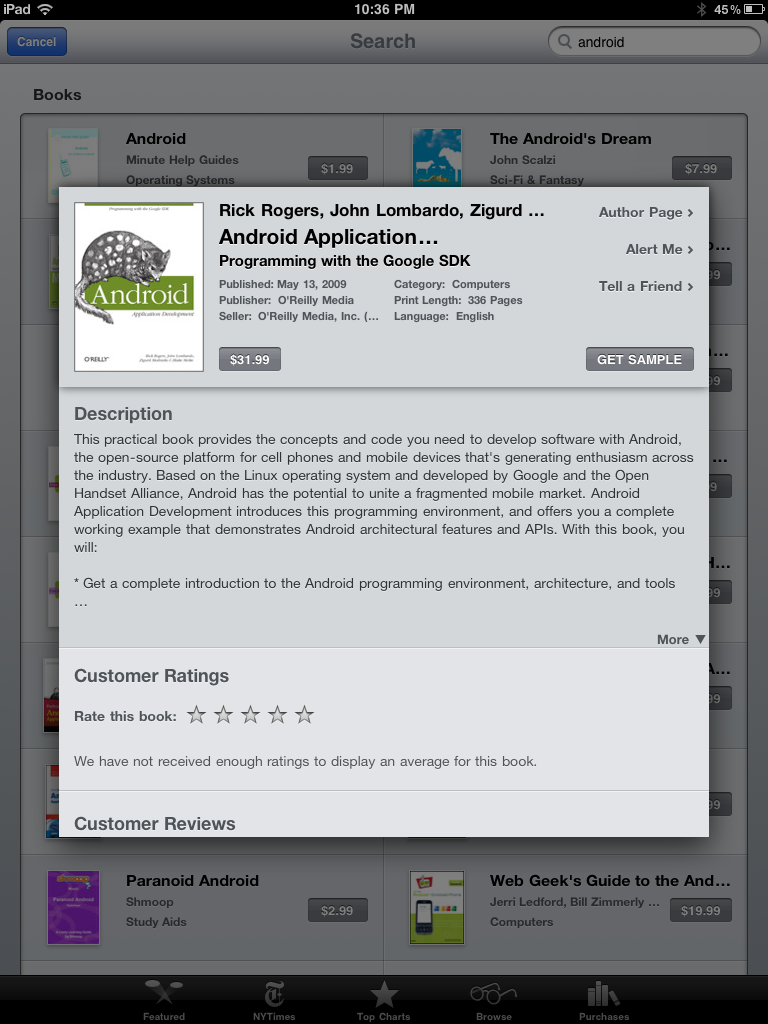
Curious to see how hard it was to find Android related content on iTunes, I looked around this evening, and while it's not easy to find, it's also not impossible, especially if you branch over to the iBooks section of the store.

Hey Look! A Magazine that Mentions Android on iTunes!

I even found a smartphone-centric magazine in the App Store that looks like it regularly features Android content and reviews. Smartphone Essentials Magazine uses Android as one of its keywords, and the application displays Android phones on some of its covers. If centering on Android is verboten, it looks like featuring it is just fine.

The iBooks section of the iTunes Store is overflowing with Android titles, highlighting Android apps marketing, Android application development and top apps on the Android platform for business, games and entertainment. There are books on free Android apps and wireless apps, reference apps and geeky guides. The simplest of these float for $2.99 apiece, while the developer tomes check in as high as $35.99.


Android Books Galore in the iBooks Section of iTunes


Staying in the iBooks section, and flipping the search from Android to Google also doesn't show the impact of mass censorship and whiting out of competition one could expect if Apple had escalated the war of words to an unprecedented level. The bookshelf shows "What Would Google Do?", "Marketing in the age of Google", and many more titles on analytics, ads and SEO.


What Would Google Do? Not Censor, Probably.


In the Android market, which doesn't have the notorious human filters to it iTunes does, searching for iPhone doesn't come up empty either. There's O'Reilly Media's Missing Manual, iPhone themes to skin Android, and more. Don't let the fact that less than 50 people have downloaded the missing manual fool you, it's there, even if it isn't very popular.


The Android Market Isn't Afraid of iPhone


Brutish bullheadedness on the part of Apple to try and force consumers, publishers and developers into a predefined world of what's acceptable and what's not fatigues my good will toward the company and the platform. The beauty of its apps, core OS and devices may be unmatched, but I fear they are on the brink of misusing their market position in a way that would raise fierce scrutiny if it was somebody else performing the evil deeds. The company should not expect its exclusionary behavior, if it is indeed true, to go unchecked, for even if it is not in a monopoly position, it is playing an unacceptable role with considerable market power. I cannot adhere to the belief that this company knows what is best for me and for all its customers every single time.

Apple and Google have an uncomfortable relationship now. Google's apps play a core role on the iPhone. Google search is the default engine on the iPhone and in Safari. But Apple is clearly threatened by Android and is squirming under the heat coming with the platform's market growth and feature creep that arguably brings it to near-parity in quality. That the iBooks section does not shy away from showing Android titles gives me hope that this ban is an exception to the rule and that we're not on a slippery slope that damages consumers and developers. Google would never remove Apple and Mac or iPhone results from their search engine, and the company helpfully offers Mac hardware to employees, and will keep doing so until some theoretical future where Chrome OS notebooks usurp that role.

As a businessperson, I get Apple doesn't want to help the enemy. I understand they are not a government entity, required to offer constitutionally-protected free speech. But I do not like the role they are playing as arbiters of morality and markets. The company has proven it can compete and do extremely well in offering high quality software and hardware in desktop and mobile, and should focus on marketing its own brand without its power to pretend alternatives exist.

Want to make customers forget about competition? Make something dramatically better and execute. None of this censorship garbage.

June 01, 2010

iPhone Armageddon: A Week With Android & EVO

Last Monday, I mentioned that I was starting a self-initated experiment to put my iPhone aside and use the Android-powered HTC EVO, with Sprint voice service, exclusively for at least the full week. Curious if Android and the new handset could live up to the same standards, or better, than those I have come to expect from Cupertino for the better part of two years, what is worth noting is that I haven't gone back to the iPhone out of frustration at any point. I haven't lusted after any specific functionality or felt completely at a loss for specific applications, and most importantly, I know that if the iPhone platform were to magically evaporate from the Earth tomorrow, all would be well, because the iPhone is no longer the only highly qualified smartphone game in town. I expect I will be watching Steve Jobs' WWDC presentations very closely later this month to see what is the story with the next generation iPhone and software, but I would be perfectly happy if I never had to use an iPhone again.

Making a choice of smartphones is not a winner takes all proposition any more, as I mentioned on Saturday, so I am not going to tell you what you should do with your mobile plans. Instead, the goal is to share what I found as differences between the two platforms' combined experiences - from software, hardware and execution.

Voice Quality: No Dropped Calls With Sprint - Ever.

First things first, and this is a big one... I have not dropped a single call or complained about voice quality in any way in my use of the HTC EVO. On the iPhone, whether a call would drop unexpectedly or not was a constant concern. Whether you think fault lies with AT&T or with Apple, the fact that this problem continues to be so widespread, with no end in sight, is a major point in the corner for Android's wide array of carrier options. Once I forwarded my calls from iPhone to the EVO, and connected the EVO to the bluetooth in my car, nobody ever had to know I wasn't using my original phone - except for the fact the calls always went through. The only issue I have ever encountered related to the phone is that Sprint's 30-day trial doesn't include international access, so when I missed a call from Barak Hachamov of My6sense, whose main number hails from Israel, I couldn't call him back.

If Apple goes through another WWDC, and beyond, with AT&T having an exclusive, the platform will have major problems - regardless of Android's perceived quality or app ecosystem. But everything I have heard points to Apple at least partnering up with Verizon as an alternative in the near-term, which will stem the tide of switchers.

   
App Screens on my HTC EVO - Much like the iPhone


Starting With the EVO's Apps, Screens and Widgets

Initial experience with the EVO, and my continued use over the last week plus, has been very easy to grasp, coming from the iPhone platform. While the device is not without its issues, as evidenced by the somewhat arcane error messages I encountered with some frequency, and the not-invincible battery life, I rapidly set up the phone's home screen and subsequent pages with many familiar application icons, just as I did the iPhone. But Android also offers the ability to add Widgets, which are essentially smaller live applications that display content directly, without having to be opened. For example, I added widgets for Twitter and Facebook, letting me thumb through friends' updates directly. I also added widgets for Google Analytics, Google Buzz and Mint.com, giving me stats at a glance.

  
Twitter and Facebook Widgets, Plus All Screens At Once on the EVO

Sliding between phone screens on the EVO is precisely as you would expect, coming from the iPhone, with a few small twists. While the iPhone starts with the home screen fixed to the left and subsequent screens are to the right, the EVO home screen is the center position, atop an arc, with screens both to the left and right of center. And unlike the iPhone, you can tap the home button twice to see all screens, offering quick navigation to one or another.

Also a benefit in the EVO's corner - the option to install applications without taking up valuable screen real estate. In the world of iPhone, every downloaded application gets a spot on one screen or another. On the EVO, removing apps from a screen doesn't delete them, as they are all essentially shortcuts. I could even put multiple instances of an application on one screen or multiple screens if I felt like it.

   
Many Apps and Widgets Are Available on the EVO

Future Features Above the iPhone

Other major benefits to the EVO that the iPhone 3G lacks (note I do not have the 3GS) are much discussed, from multi-tasking to offering a wireless hotspot, tethering, an integrated camcorder, and a front-facing camera. We know the 3GS has the camcorder, and the lack of tethering again falls to AT&T, while multitasking arrives in iPhone OS 4, but the EVO has all these today, not forcing me to wait for the next rev of software or for the carrier to catch up to competition.

The Notifications Box Keeps Me Updated On What's Happening

One of the features I have enjoyed on the EVO is pull-down Notifications tab which, from one place, alerts me to new e-mails from both my .Mac account and GMail, mentions on Twitter, updates on the Marketplace and shows me the current status of any music applications I may be running - including the Android version of Sonos (Androinos), Last.fm, or Sirius XM Radio.


Multi-Tasking Is Great, Except for Multi-Crashing


Errors Are Not An Uncommon Sight On the EVO


The ability to multitask on the phone is extremely welcome. It's not uncommon to be running a music service in the background, while browsing another thing on the Web, having e-mail getting checked on multiple accounts, and, possibly, letting the phone's built-in Navigation alert us to the next stop. (So long as I am in the passenger seat, of course) But multitasking is not without its problems. In addition to what some people have said is poor battery life, I was frequently surprised by background apps crashing and needing to be force quit, while I was using another app. The good news was that the foreground app could keep going, but the frequency of crashes - combined with engineering-friendly explanations as to what actually happened, should get a lot of work as the platform (and accompanying devices) increase in sales and get picked up by less geeky customers.

A Maps Crash Interrupted My Baseball Game


Apps and Apps Everywhere - Quality Needs a Boost

Coming from the viewpoint of an iPhone-a-holic, the breadth of offerings on the iTunes App Store set the stage to potentially be disappointed with what I often heard was a non-comparable Android Marketplace. What I did find, however, was that practically every need was met when I searched for it. Almost all the major applications I truly wanted are posted on both platforms, and for those that are still not there (for example, my6sense, CinchCast and Redfin), in most cases, I already know Android versions are in the works. Where the Marketplace did often fall short, however, was the quality of the apps.

   
Redfin and Etrade are Two Notable Holes In the Marketplace

For the most part, it is easy to determine that iPhone and iPad applications are better than those on Android, in appearance, polish and ease of use. Instead of all the major brand names one can see dominating the iTunes store, the Android Marketplace is populated, seemingly, by lesser-known developers, often unaffiliated. That doesn't necessarily spell bad news for the Marketplace. I would chalk that up more to the newness of the platform, and its open source ties, while iTunes is more tied to labels and has had a big headstart. Those of us who tried to buy music off iTunes back in 2003 and 2004 remember fondly how light the options were back then as well - so I wouldn't be surprised if the same kind of migration headed Android's way, and quality improved.

Back in October, I started talking aloud about the opportunity for Google to replace Apple in many of the applications and devices we Mac fans have enjoyed. One of the biggest draws for Apple users is the company's integration of software and hardware. My Apple devices work best with MobileMe and iLife keeping all my digital media in one place, from mail to calendars, music and photos. The iPhone and iPad leverage that marriage. But the Android platform is married to equivalent Google services - meaning to gain the best experience, one should optimize their Google Contacts, GMail, Google Calendar, Google Talk and other apps. Once complete, the Android/Google data concept could be as interwoven as the Apple iPhone experience has been. For me, getting to a happy state meant exporting my Address Book contacts on the Mac and reimporting them to my GMail, which also impacted my Buzz connections, but made the Address Book on my HTC EVO completely up to date. Purchases from the Android Marketplace also tapped my Google Checkout account, associated with my GMail.

Photos and Video

Hard-core gadget geeks who like to dissect every megapixel might want to know how the EVO's camera (and camcorder) stack up against those of the iPhone. First of all, the camera on the EVO is higher resolution. It also automatically focuses on the main subject of the photo, to the best of its ability, and it offers Flash as well. The front-facing camera is also a nice touch, even though it is of lower quality. You can also see a few of the videos we made with the EVO on YouTube. Solid quality equal to that from our Casio handheld - even if not a professional offering.

Where the iPhone wins here is the ease of integration with iPhoto, and multiple issues I had with EVO saying I didn't have file permissions set correctly on my SD card when it came time to actually take pictures or shoot video. If you have ever been somebody who needed to take the picture - right now - it's not exactly the time to try and troubleshoot file permissions, consider unmounting the SD card, or turning the phone off and on, so that was frustrating.

Don't Assume Your Geeky Target is the Only Audience

Also frustrating? The frequent feeling that I was working not with polished software, but with a product still in beta. While Google has no doubt made tremendous strides in their development and release of Android in the last few years, basic elements like taking a screenshot - which on the iPhone is a snap - require too much research, or investigation into third party apps. The error codes also seemed to be better served to the developers making the product and not the end user, who could care less if (process com.google.android.apps.maps) stopped unexpectedly. I also wondered at times where I was downloading software to, in the rare case I did, or why I had reached the number of maximum windows open in my Web browser when, so far as I could tell, only three were.

I did test out the EVO's hotspot capability, thinking the feature would come in handy either for long car trips or outings to the park when one of us would want to bring our 3G-less iPads. Sure enough, it worked. By turning on the EVO's hotspot capability, my daughter could browse YouTube in the back seat on the iPad as we drove from our home to Palo Alto, and while she's only approaching 2 years old, she didn't complain about any stuttering or slowness. That said, trying to type or use the phone when it was in hotspot mode was pure molasses, so if you are running it as a hotspot, make sure that's all you're doing.

Power Up, Captain!

Other reviews of the EVO have slammed the product's battery life. I won't. For me, practically the only major computing device I can trust to not run down quickly is the iPad. I have always left my iPhone powered up overnight and carried my USB cables with me in case I needed a charge. I found the EVO to be similar, and even left it unplugged overnight a few times with no problems, finding it half-way full the next morning. If you use the phone as an alarm clock, as I have been, it's much safer to use the EVO unplugged than it is the iPhone, which might die before asking to wake you up. No doubt the EVO can consume plenty of juice, but that's due to the many things you are able to do at once. If you do think you're sucking down too much power too frequently, it makes sense to get a Task Killer and stop all wayward apps whenever you can. I found myself doing this often - a necessary evil of sorts that one hasn't had to encounter with the one app at a time world of iPhone, but it hasn't been so troublesome as to stop me from recommending the EVO as an option.

Conclusion (For Now)

Going into testing the EVO (And Android in parallel), the goal was to discover if making a switch would eliminate problems or introduce them, while adding features or stopping me from doing things I have always done with the iPhone. What I found overall was that the EVO gives me access to all the core pieces I need in a phone - from high quality phone calls and Bluetooth support, to a solid Web browser and access to bookmarks, contacts, calendars and e-mail. The EVO was built with more hooks to sharing and social sites than the iPhone has been, with much more flexibility in terms of how the device could be configured, with all sorts of static and live wallpapers, or different scenes that come bundled with the phone. Of course, the missing core for EVO is iTunes. The Marketplace is good, but until the Chrome Web Store debuts, there is no equivalent for browsing the PC and finding rich applications, music and media.

Anybody who thinks that Android is miles behind the iPhone in terms of usability and flexibility at this point is wrong. Yes, the Android experience has some rough edges, but they can be smoothed with time. There is no shortage of applications for download - even though some major names haven't yet made the move. Meanwhile, call quality on a respected carrier can make all the difference in the world for the basics of what the phone is supposed to do in the first place. My 30-day trial with Sprint goes through mid-June, after the conclusion of Apple's WWDC, which gives me plenty of time to keep using the EVO and watching what's next with iPhone 4 on iPhone OS 4.0. But I am feeling much more tempted to investigate the process of porting my number to Sprint than I am feeling tempted to go back to the iPhone right now. If I want an iPhone experience, I'll just go pick up my iPad.

February 15, 2009

What's Growing Faster? Software Bloat or PC Capabilities?

There is an old adage in the storage business. No matter how large you make the hard disk, users will find a way to fill it. The same seems true in the bandwidth and networking business - build a bigger pipe, and customers will find applications that use it up. The same concept extends to me as a consumer, for my traditional software experience. While my laptop is tremendously more capable than its predecessors of 2, 5 or 10 years ago, it sure doesn't seem like the software loads any more quickly, and I still find myself closing applications or forcing them to quit when the whole thing grinds to a halt.

Back in late 1998 after I got a first-generation iMac, complete with a then-acceptable 32 megabytes of RAM and a 4 gigabyte hard disk, I marveled at the gargantuan install needed for the latest version of Microsoft Office. I remember specifically telling a friend to just wait... as the next one would take more than a gigabyte of space. Sure enough, that's practically accepted, and now, it's not too uncommon to see downloads, and even software updates, that are in the hundreds of megabytes.

But the issue is less about capacity and more about the perception of speed. Yes, my laptop can do more than its forefathers. It can do new things with the Web and with video that were never before possible. But booting Microsoft Office, Adobe PhotoShop, FireFox and other products still manages to slow down my system to a crawl. It's gotten to the point that I've even eliminated possible reasons for the slowdown. I hardly ever boot into VMware Fusion any more, to run Microsoft Outlook. I stopped using an external monitor at work, and try to recharge my iPhone only when I don't need full use of my MacBook Pro. And that doesn't even extend to other RAM and processor hungry apps, like one of my personal favorites, TweetDeck.

For whatever reason, it seems that software developers have, for the most part, chosen to add features, and not optimize for speed. I don't think it took more time to boot Microsoft Word 5.1 on my old Performa than it takes to boot Microsoft Word 2008 on my MacBook Pro, even if the Megahertz speed on the processor has increased from 33 MHz to 2.2 GHz, and the RAM from 24 Megabytes to 2 Gigabytes. And lest you think I'm picking on Microsoft, Apple's iPhoto has also been a slow to load memory hog in its own right.

If somebody told me ten years ago that I could increase my processor speed by 1,000 percent, and my RAM by about the same amount, I would have expected to be able to hit "Select All" on my Applications folder and then "Open" to run them all at once. But there's no way. At this point, even with my current machine, I probably can run Mail, iTunes, a Web browser and one more application without slowness. Add one or two more apps to the mix, and we're in spinning wheel city.

In one my recent tirades against how often my machine was slowing down, I heard the all too common reply: "Time for a new one?" but the answer should be no. It's time the pace of the treadmill whereby hardware needs to speed up to handle the new software should slow. Get it to work, and get it to work fast. Please.

January 26, 2009

Twtapps: A Suite Of Five Simple And Unique Twitter Apps

By Mike Fruchter of MichaelFruchter.com (Twitter/FriendFeed)

When it comes to Twitter, there are hundreds, if not thousands, of applications built off its API. Back in November, I highlighted 15 unique and useful Twitter tools for your Twitter toolbox. Today, I ran across a company called twtapps. They develop simple, fun and useful twitter applications, and have a total of five developed. These applications do not post directly to Twitter, but instead they give you the links to share them on Twitter, Facebook, e-mail or any other social network of your choosing. This post profiles their five Twitter applications.

1) Twtcard.com


twtcard is a simple greeting card for Twitter. Simply type your message, enter your Twitter user id, and select from one of the fifty square-head graphics. After you create the card, you have the option to Tweet it, or share to Facebook. You are also given a URL for your card. Here is what one looks like.

2) Twtvite.com


twtvite allows you to create and notify your Twitter friends of an upcoming event. Create the event, enter the location, date, time and the events details, and share it/ manage RSVPs. This is an application that will come in handy. The invite updates in real time as people respond with either, yes, no or a maybe. As with the rest of these applications, you have the option to Tweet it, or share to Facebook. You can also embed it on a website.


3) Twtpoll.com


twtpoll is similar to socialtoo.com, it allows you to create a very simple survey. Simply type your survey question, fill in the choice answers, and embed/share it. Survey participants can even leave comments after they have completed it. Here is what one looks like.

4) Twtpets.com


twtpets is a twitter game for pet lovers. To play the game, enter your pet's name, upload a picture, and add a description of the image. Then your pet does battle against other Twitter user's pets. It's a one on one battle with random images displayed for your pet's competitor. Refresh the page and your pet does battle with a new victim. Tyson, my boxer, pictured below did battle with Sadie the Shih Tzu. Here is what the battle page looks like. You also get a pet scoreboard to see how good your furry friend is doing.


5) Twtwlst.com


twtwlst is a gift registry twitter app. This is an Amazon wish list for Twitter. You can create a simple wish list for whatever the occasion is, and send it to your Twitter friends. Enter the occasion for your wish list, the products you want, along with a link to where they can be purchased. Tweet it, share it, and embed it on your site. Your friends now can"t say they forgot the occasion. Here is what a live one looks like.


Read more by Mike Fruchter at MichaelFruchter.com.

December 19, 2008

Booty Blocks: Addictive Underwater Columns-Like iPhone Game

Games like Bejeweled, Columns and Tetris are mainstays for any small-time video game addict. Over the last year, with the advent of the iTunes application store, the iPhone has developed into a force to be reckoned with in the world of handheld gaming, taking on both Sony and Nintendo. And with that growth comes the introduction of new, innovative games that build on the well-known titles and take advantage of the unique features of the iPhone, including multi-touch and the accelerometer. Among the more fun games I've enjoyed is the new Booty Blocks - which landed on the store just yesterday.


Booty Blocks: Lining Up Same-Colored Boxes

Booty Blocks, developed by Planet Moon, starts out as the latest of the traditional falling block games, dropping individual colored boxes, or "pirate booty" from the top of the screen. When five like colors are connected, you double-tap on the phone to have the boxes explode, and free up even more space. But you'd be remiss thinking that this was just "yet another" game like this. Unlike just about every other game I've seen, which locks the blocks in place once they've fallen, you can move the boxes left and right, up and down, with the push of your finger. And you can even tilt the iPhone left or right to shift the full set of blocks at once.


Booty Blocks: Setting Combos and Blowing Stuff Up

When I first started playing Booty Blocks, I thought the game might almost be too easy. Connect the boxes, blow them up. Repeat. But of course, the game got harder. Not only did the boxes start to fall more and more quickly, but there were new wrinkles tossed in to make my job harder. New metal boxes would show up and impede the boxes during their descent. Two-square blocks would fall and leave gaps. New colors. And other boxes would require being blown up more than once to clear them from the screen. Then, kegs of dynamite would fall, which, when blown up, could hit the boxes sky-high.


Booty Blocks: Seeing the Crates Pile Higher

Before I knew it, I was having fun, and learning I could propel my score ever higher, as I cleared multiple combinations on the same screen, sweeping rows of blocks one way, and others another, all while more boxes fell. And while I did rack up more than half a million points, I have a feeling I'll do much better my second time around.

Booty Blocks, available for $1.99 from the iTunes store, is a great example of a new breed of iPhone applications that bring new interactivity, and show you don't need a keypad or many buttons to have a real video game experience.

To see a video of the game in action for yourself, check out Drew Olanoff's blog here: Booty Blocks for the iPhone and iPod Touch is out!