Showing posts with label Regator. Show all posts

June 17, 2011

Regator Introduces Streaming Breaking News App

Regator has had its eyes on the social media and blogging trends space for the last three years, following the introduction of their blog search engine in 2008, expansion to mobile the following year, and expanding to display global trends just last year. A week ago, the company introduced a new application, reminiscent of TweetDeck and LazyScope, which they are targeting at newsrooms and bloggers who don't want to miss stories in their field as they break. The company believes that its ability to closely follow social media channels gives them the ability to deliver alerts to top stories long before they arrive on traditional sites, helping writers get their stories out ahead of competition.

Meanwhile, if you're not shackled by the AOL Way or at a post mill like some of the major blogs, as a consumer, the new app can simply be a fun way to stay on top of the top news on topics you care about, cascading down your stream in a multi-column Adobe AIR app, with Growl alerts bringing new additions to your attention immediately.

Regator's Breaking News Service on My Desktop

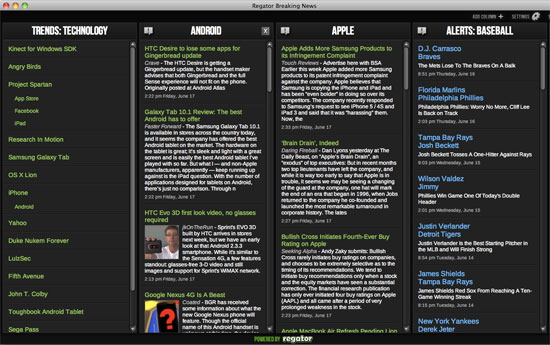
With TweetDeck nearly three years old, the environment of a chronologically-ordered multi-column AIR app is very familiar to most. Regator mines its content repository, surfacing alerts from many different fields, including Entertainment, Sports, Politics, Fashion, Travel, Food, Tech and more, and more specifically, trending topics for all of the above, including subcategories like Social Media, Gadgets and Hardware for Tech, or Astronomy, Chemistry and Physics for Academia. You can also add columns for search terms of your choosing, and with the pro application, a Notes tab, intended for journalists sculpting stories discovered in the program.

To get the best handle on the app, I'd recommend starting with top trends in a major area of your interest. For example, my "Trends: Technology" column shows news of the day, from Research In Motion and LulzSec to more consistent updates from the world of iPhone, Android, Yahoo!, and yes, Angry Birds. Clicking any of these specific topics opens it up in a new column, so if you've got a beat that is interested in three or four major topics, you can just leave this app open and let the stories flow.

Top Stories on Samsung Galaxy Tab and Apple in Regator

In years past, I got excited about products like Lazyfeed, which did more than just follow individual blogs you had subscribed to or friends you followed, but topics you selected, and its partner, LazyScope, which combined quasi-RSS subscriptions to the Twitter experience. Regator has delivered an app that uses social as its content repository, but presents it in a way that is much more like a news wire than a social service. So you won't see which social media personality made a story popular, or any traditional social actions, like retweeting or favoriting. Just raw content with links to the source. It's a great way to get caught up on the news you like without having to suffer through all the topics you don't.

A limited Web version of the service can be seen at http://breakingnews.regator.com/recent/, showing breaking news in the topics you select or more global content.You can also get the app on the site by going to https://breakingnews.regator.com/manage/ and clicking "Download Desktop App".

May 03, 2010

Regator Revamp Adds Blog Trends, Monitoring, More

In the last few years, much of the Web's focus has trended toward social networks and microblogging, and away from more traditional blogging. Twitter and Facebook are on the tips of most people's tongues, even when those sites often serve as much to link to news and blogs elsewhere, in addition to the much-lauded status updates. Regator, the blog search engine which debuted in mid 2008, and introduced a solid iPhone app one year later, is poised to revamp its service while keeping blog content front and center. The result, in preview now, is a solid data mine for content, trends and topics. In theory, the site could outright replace Web 1.0 engines like Technorati, and it looks to be significantly more useful - no matter your focus of interest.

Regator still presents itself as surfacing the world's best blog posts from the world's best blogs. Not all make it in the highly selective network, but there are many quality sources that do in practically every subject, from Academics and Arts to Politics, Religion and Tech.

Regator's new preview steps up its blog coverage by showing trending topics, as Technorati never got quite right and Twitter and Google News have for their own properties. From global trends (such as Times Square and the Gulf of Mexico) to topical trends (such as Steve Jobs and the iPad 3G), Regator quickly updates you at a glance on what the blog world is talking about.

As the site does now, you can still see popular and new stories by topic, as well as those with audio or video. But you can take a step further with two new sections, including trends and monitoring.

How is iPhone Trending in Blogs? Regator Knows.

With Regator's deep archive of blog topics, you can compare up to three keywords, and see how they are spiking over time. Not unsurprisingly, Gizmodo spiked well beyond Engadget around their iPhone 4 coverage, and Apple dwarfs almost anybody else during Steve Jobs keynotes. You can see first day launches of products like Google Buzz, and the ensuing fade of coverage, or you can see consistent updates on more broad terms, such as "laptop", which only shows dips every weekend.

Monitoring some Interesting Topics In Regator

Should one-time visits to the site not be enough, you can tap into Regator's blog monitor to follow keywords and send you updates on these keywords - much like Google News alerts and TweetBeep.

You Can See Which Blogs Mention Specific Topics Most

Regator may have started out as a way for the community to help find the best of the Web through up arrows and down arrows, but its upcoming revamp, which you can gain access through via invites, looks solid enough to be the highest quality blog search available, with deep trendspotting. I will keep using Icerocket search for finding all mentions from all blogs, but Regator has trimmed the fat and returned with the best.

Just go to http://preview.regator.com with the invite code: "louisgraysentme" and check it out for yourself.

August 18, 2009

Regator's New iPhone App Offers News On the Go With Bite

For as much content as I might be creating, with new blog posts, and social media updates scattered across a myriad of networks, I am still far from satiated when it comes to data flowing the other way. My days are spent embedded in Google Reader and FriendFeed, with TweetBeep, LazyFeed and BackType filling in the gaps I may miss. But when away from the laptop, it's my iPhone that keeps me connected to the world wide publishing machine. With the introduction of a new application from Regator (www.regator.com), I now have three solid options for finding relevant data when I am praying to the duopoly of Apple and AT&T. Added on to MeeHive (review) and My6Sense (review), I am getting dangerously close to knowing I won't miss anything, even when I clip my laptop leash.

The three applications (My6Sense, MeeHive and Regator) have slightly different goals. My6Sense looks at data you have imported and tries to learn from your behavior what is most relevant to you as an individual. MeeHive not only offers general news, but also, personalized data based on its knowing what I like, thanks to my answering a series of survey questions. Regator plays more of an editorial role, having hand-selected the best of the blogosphere (in their mind) and offering it to you in easy to navigate sections.


The Main Regator iPhone Page (and Technology Trends)

Upon opening Regator, you get a popular news overview from the Web, which, depending when you look, could offer you a mix of technology, celebrity news, politics, healthcare or sports. To find the newest updates, click the New button at the bottom, or, more interestingly, you can click Trends to find what topics are gaining momentum in the blogosphere. (For example, top trends today include Robert Novak, Brett Favre, and the iPhone)


Regator's Technology Section and My Blog Archive

But more specialization takes place when you look at the bar below "All Topics" at the top of the Regator app. You can find subsections from Poltiics, Religion, Sports, Local Interest and others. Of course, being a techno-focused media consumer, that's where I expect to spend the most time. Regator lets you "swipe" through the lists left to right and right to left to drill down on your topic, and you might be surprised as to how deep their data goes. If you click too many times in the wrong place, you just might find yourself in Architecture under Construction under Occupations, for example. Regator has all the data, and is just waiting for you to find it. And yes, should you get lost, just click home to go back.

Of the three applications, Regator has the smoothest, most colorful, interface. It has its smiling gator atop each page, features thumbnail graphics and large colorful buttons. Just about the only thing it doesn't do which I wish it did is clearly offer full-text of the stories (now, you have to click a second time following the excerpt). On My6Sense, I can read a full story and go back to my list, as it pulls from the full RSS feed. On Regator, I initially only see the headline, a thumbnail and an excerpt. Meanwhile, Meehive just clicks through to the original story as if I had opened a new browser window.


Regator: Searching for iPhone and Vanity Search Results

Regator also offers the option to search by keyword, or to browse the product's very-deep directories. Should you find an individual blog that you like, you can choose it, and scroll down to see more entries, going back for several months at least. It aims to offer what it calls the Web's Best Blogs, and it does a great job finding high-quality content from a wide variety of sources. The new app is available for free on the iTunes store. Don't be thrown by its 17+ rating. That's just Apple being confused.


Disclosure: Kosmix.com, author of MeeHive, is a client of Paladin Advisors Group, where I am General Manager of New Media. I have no relationships with other companies or services mentioned in this article.