Editor's Note: On July 4, 2008, TweetDeck, a new Adobe AIR application for Twitter, was introduced to the world, on this blog. Twelve months later, it is unquestionably one of the most popular microblogging clients in the world. I had the opportunity to trade e-mails with its developer, Iain Dodsworth, to learn more about his journey, and what's next. -- Louis
 Louis:
 Iain, first, thanks for the opportunity to talk to you about TweetDeck on the one year anniversary of the product's unveiling to the public. I was happy to play a small role in its debut, and having gotten the opportunity to watch as its visibility and influence has grown dramatically, not only becoming arguably the most popular third party
Twitter application, but becoming the gold standard by which all competitive offerings are compared, and setting a new bar for Adobe AIR as a development platform.
Now twelve months into TweetDeck's life, your world has to have changed significantly. First, Twitter has exploded - from a time waster and communications tool for early adopter tech snobs to a household buzzword being featured on television and media practically around the clock. Second, you've grown up as a business, having taken on venture funding, and employing a team of developers to improve your product - having recently introduced an iPhone application. Meanwhile,
Seesmic Desktop has emerged as a real competitor,
PeopleBrowsr has managed to take the top space for most chaotic Web experience, and
Tweetie has a popular niche on both Mac and iPhone.
When I first stumbled upon TweetDeck in July of 2008, I was curious, finding what could be a great product, but nobody had heard of it before. Going back to the e-mail archives, I remember your saying, "I am furiously coding away getting the next version out there," and adding, "Since you are the highest profile person who has seen TweetDeck it would be great to capitalize on your visibility."
I don't usually consider myself high profile, and there are many elite names out there with well known brands who could have made a bigger splash with TweetDeck than I did. When you were ready to launch the product, did you do any outreach to other sites? Did they respond or offer to test it? And if you did not reach out to other sites, how did you expect to spread the word? Did you think the product was strong enough that users would tell friends and it would go viral?
Iain: It's important to note that I originally built TweetDeck to solve my problem of being overwhelmed with Twitter. I gave it out to a few friends and was pleasantly surprised by the response. I then set up a private beta and became inundated with requests from complete strangers. It was because of this virality I didn't reach out to anyone to push it out further and then I received your email. The blog post you wrote on July 4th and the resulting mayhem essentially forced the private beta wide open and TweetDeck went public.
Iain: BTW do you remember how you first came across TweetDeck?
Louis: I stumbled upon TweetDeck practically by accident. I happened to look at my Twitter stream and I saw "from TweetDeck" in an update. I then clicked through, and searched the Web to see if I had found something new.
Louis: What made you decide to develop TweetDeck? You certainly went a different way with your product than others did, using the multi-column format, integrating Summize, groups, etc? What drove its initial feature set and had you choose the AIR platform?
Iain: In March 2008 I revisited Twitter having found little value on it a year or so earlier. Now there were so many more people using it there was real value for me but I quickly become a bit overwhelmed after following around 50 people. Most importantly I started to miss when certain less-chatty real life friends tweeted and I realised if I segmented the stream I would be able to concentrate on these valuable parts of the stream and dip in and out of the rest. The dominant apps at the time (twitter.com,
twitterrific, twhirl) were, and still are, superb at what they did but they did not help me with segmentation so I decided to write my own client.
Segmenting my friends out to a separate area was the catalyst for the creation of groups (a first for twitter applications afaik) and required a new approach to the UI. I wanted to see my twitter stream alongside numerous groups and searches updating in real-time (hence the multi column approach - another first) and this would never fit efficiently into an unobtrusive single column interface so I took great delight in building a large obtrusive interface which really demanded the users full attention - not unlike the financial dashboards I'd been involved in building and evolving before TweetDeck.
AIR was an easy decision at the time - I had already been developing applications in Flex for financial institutions in London and there was no quicker way for a one man team to develop an application cross-platform.
Louis: What was your initial reaction to how quickly word spread around TweetDeck? Did you feel prepared for the amount of traffic, support requests, or feature enhancements users were looking for?
Iain: Quite honestly my initial reaction was one of shock and extreme excitement. I was in no way prepared for the response TweetDeck got and then the subsequent demands the userbase, quite rightly, put upon me to keep improving it. Whilst I was unprepared I like to think I did show I have the ability to be very agile and step up to the challenge which the following months presented i.e. working 16+ hours a day, 7 days a week and knowing which elements of functionality to integrate to provide most value for the users.
Louis: By September of 2008, you sent me an e-mail titled "TweetDeck - the future". You said, "with the integration of numerous other social messages services we have the form factor, momentum and enthusiasm to make TweetDeck something quite spectacular." But you added you needed revenue or money to get there, leaving you with the options to attract angel investment, or make a pro version.
At the time, I remember saying it might be easier to go pro than to get funding, unless you had other products lined up. But as often happens, I was wrong, because in January, you closed a round with Betaworks for seed funding. Did you initially think of making a pro version of TweetDeck, and what changed your mind, if anything? How did you find Betaworks, and was that fundraising process intimidating or easy? What kind of requirements did they put on you in order to be funded?
Iain: A TweetDeck Pro version was certainly on the cards a few months after the initial launch but more as a response to the need to generate some revenue to enable me to continue working on it full time rather than fulfilling a specific vision or demand from the userbase. When Betaworks approached me with the proposal of leading a seed round it made perfect sense to use the funding to fund my continued full time development and work towards a real vision (which by this time had already fully crystallised) rather than fragmenting the product just to generate revenue.
I wouldn't say the fund raising process was particularly intimidating - although I'm very aware I had the distinct advantage of Betaworks leading the round and introducing me to potential investors along with legal representation which made the somewhat complex process of setting up TweetDeck Inc and closing the round rather smooth.
Louis: Betaworks has some very visible investments in other Twitter-related properties, including bit.ly and Twitter itself. Some are saying the firm is helping each of these small companies get connected, and asserting itself in their development. How has Betaworks' enthusiasm for Twitter helped? How involved are they in your product's continued development?
Iain: Betaworks' enthusiasm for twitter, TweetDeck and the concept of real-time data streams has been invaluable to TweetDeck and to me personally. I talk with John and Andy practically every day and consider them part of the core team rather than just as investors. The same goes for Saul and Robin Klein (TAG) who I work very closely with "on the ground" in London. Each of the investors in TweetDeck bring a distinct level of expertise and experience to TweetDeck and I have been leveraging this as much as possible.
Louis: Recently, one visible move for TweetDeck has been the customization of the application, first by Blink 182, and now you can see dedicated installs for popular blogs including
TechCrunch and
Mashable. While this is clearly one way to start monetization, it cannot be the only plan, especially as you have taken on additional developers and the funding from Betaworks won't last forever. As Twitter has also not publicly announced its plans for monetization, does operating in a field where many users demand free software have you worried? How do you think you can create premium value? And in the converse, you opted to make the recent TweetDeck iPhone application free, but I know some users, including me, would have been more than happy to pay. Can you share the thought process there?
Iain: Co-branded TweetDecks could be a viable revenue stream in the future and are definitely not the only monetisation plan. Essentially with the size of our user base we are able to test a number of small revenue streams in an effort to see which ones can scale with the user base. I am extremely comfortable with offering free software but this does not mean that every subsequent value-add service and element of functionality have to also be free.
The decision to make the iPhone application free was not a desperately easy one but, fundamentally, the potential future value of having a larger userbase far outweighs the short term spike we'd get in iPhone revenue.
Louis: TweetDeck, while popular, has also highlighted issues on Twitter's end, especially around the service's API limits. Also, the product has been a notorious memory hog and can take a good share of processing power. How are you working to reduce the demands taken on power users' desktops, and how have you found working with Twitter and their API team, as they recently upped the API accesses users could hit per hour from 100 to 150?
Iain: I have worked very closely with Adobe to make improvements to the TweetDeck codebase and to work around various AIR/Flex issues. CPU & memory usage is an ongoing area for improvement and can sometimes be a bit of an art-form but we are getting there and the current version is a marked improvement over previous versions.
To be fair we haven't had a huge amount of involvement with twitter or it's API team. The API is very simple to work with and there hasn't been the need to be in continual dialogue with twitter. It's also worth pointing out (to those that have accused TweetDeck in the past) the twitter developer ecosystem is, from our experience, a very level playing field and being the number one method of twittering outside twitter.com has afforded us no special attention or API abilities.
Louis: There is a natural inclination for users to want TweetDeck to be the catch-all for Twitter-related services. As you have added on services like
12 Seconds,
StockTwits and others, there is no doubt a list a mile long, of everything from short URL services to survey tools that are begging to be included. How do you choose what gets in and what doesn't? Is it a factor of money now, where those who play have to pay?
Iain: Yes the list of potential services that could be integrated into TweetDeck is very long but there's no way we would want to integrate them all - obviously this would result in TweetDeck becoming a complete mess. In deciding whether to include a service we primarily look at how it fits in with the overall vision for TweetDeck (the browser for the real-time web) and what value it offers the userbase. Executing the TweetDeck vision and providing first-class functionality is everything and comes before charging companies for inclusion. As has been reported elsewhere, we have charged for inclusion in a few instances, where appropriate, and I see nothing wrong with that.
Louis: During Twitter's darkest times last year, you saw the rise of other microblogging services, like
Identica,
Plurk, Rejaw and others, who tried to provide a fallback for users tired of fail whales. Did you at any point wonder what the future held for your product, built on Twitter's fragile backbone? And did you feel pressured to find ways to publish to these other networks, much like Ping.fm and Posty have done?
Iain: Absolutely I wondered what the future would hold. The fragility of being a layer on top of twitter back then was a real concern but I also knew the flip side of this was the potential to ride the twitter wave of momentum and get TweetDeck a much bigger push than was previously possible. It is this momentum, listening to our userbase and continued execution and improvement of TweetDeck that has put us and kept us in our current position.
Louis: Based in the UK, you're stationed quite far from Silicon Valley. Can you give us an understanding of how being remote from this tech center has either helped you or hurt you? Did it impact your ability to reach press and influencers, to raise capital, or hire talented employees?
Iain: Being based outside Silicon Valley has not specifically hurt in terms of funding (we've raised capital) or hiring talented employees (we now have a fantastic 5 strong core team). It's difficult to quantify but I'd imagine our ability to reach press and influencers has been somewhat hindered by not being in the eye of the twitter storm and, it's with this in mind, I will be embarking on a "tour of silicon valley" this summer to really get to know the area and it's inhabitants and to get a presence on the ground. (So to anyone reading this - please do get in touch if you want to meetup in the valley over the summer twitter:
http://twitter.com/iaindodsworth or email:
bizdev@tweetdeck.com)
Louis: TweetDeck's rise to popularity was stunning for me to watch, and exciting to be a part of, even if just cheering from the sidelines. What kind of advice can you give developers who want to put their product on the map in terms of finding a way to reach users and create a memorable experience?
Iain: Even though the twitter ecosystem has grown considerably over the past year, I think there is plenty of scope and success for applications and services which really fill a gap. Developing something that is revolutionary rather than evolutionary will get you attention and lots of it. There are an incredible number of blogs and individuals looking to shine a light on innovative products in the now crowded twitter/facebook/real-time space - if your product is more than just an upgrade on an existing idea then this is a great time to grab some of that attention. Obviously that's only half the battle, you'll then have to continually improve, execute and listen to your userbase to keep pace - something we're trying to get better and better at.
One year can go quickly on the Web, and in the last twelve months, TweetDeck has gone from zero to a leadership position today. If you haven't yet downloaded, you can find the application at
http://tweetdeck.com/beta/. I appreciate Iain taking time from his busy coding schedule to answer my litany of questions. I personally found it valuable and hope it provides value to you as a TweetDeck user, technology fan, or fellow developer.


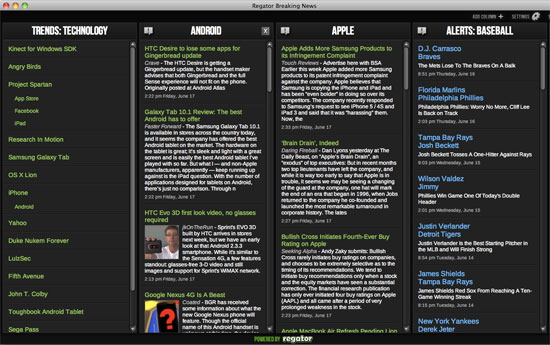


 Even as many desktop applications are migrating to the Web in the form of Web services and Web apps, some popular Web services are going the opposite way, as desktop clients are created for popular social networks, or to bring alerts to changes on the Web outside of your browser. From the seemingly-ancient desktop RSS readers to the more mainstream


 Since reversing the company's strategy away from short video clips and more toward the world of status updates, Loic Le Meur and the


 Seesmic has done more than just clone its Desktop version in the browser. The new service has a new feature that collapses updates into a single line, looking like the headline-only version of
  In time for the South by Southwest (SXSW) Interactive event, the popular information sharing and aggregation service,

