July 06, 2008

As I Get Older, Some Online "Friending" Gets Creepier

I don't know if my transition from being childless to being a father of two has contributed to my being more aware of my age, but as I get requests to be "friends" on a variety of social networks, from Facebook to Plurk, Identi.ca, Twitter and any other social site of the month, I'm finding myself a bit uneasy when it comes to "friending" young contacts.

On top of the occasional annoyance that youth anywhere from 10 to 15 years younger than me are engaging in the same networks I am, there's just something that has me hesitating every time I get an invitation from a 14 year old or a 20 year old who wants to follow my updates or be connected.

At my old age of 31, were I to be a "real world" friend of any 20 year old girl, people should be asking questions. If I were palling around with some 14 year-old boy geek, they would be asking other questions. Yet, the occasional eyebrow-raising invite hits my e-mail box, and makes me wonder if somebody just might get the wrong idea.

What if I were to take the next step and move beyond a simple friend acceptance on Facebook or Twitter and try to find out more about this person?

For example, take Mashable's Alana Taylor, age 20, or Read Write Web's Corvida Raven, age 20. I'm friends with both on Facebook, and I've had many conversations with Corvida on Google Talk, traded e-mail, and phone calls.

Alana I've never talked to, but going to her personal blog had me feeling like I was getting a bit too much information.

Similarly, a 14-year-old Josh Jenkins asked to follow my updates on Plurk, and I reciprocated. What do I have in common with Josh? And how I do I explain any interest I would have in his updates, or those from 18 year old Ivan B, 19 year old Eric Kerr and 19 year old Jared Eberle?

Thinking about it makes my head hurt a little bit. Alana's Facebook profile says she graduated from high school in 2006, eleven years after I did, and at a point where I'd been married for three years. Josh Jenkins wasn't even born until my junior year in high school. Assuming teenage dalliances, he could be my kid, for crying out loud.

Maybe I'm overthinking it a bit. I know online "friending" and "following" is growing like gangbusters for people in social networks everywhere across age groups. And I know that to many, maybe my age of 31 seems young. But isn't there something a bit creepy about all this?

July 05, 2008

TinyURL Adds Custom Alias Feature To Shortened URL Service

The URL shortening service TinyURL was first useful for sending longer URLs to friends over e-mail to avoid line breaks that would often disable links in many e-mail programs.

With the advent and massive growth of SMS and microblogging services, like Twitter, TinyURL and other services like it have become omnipresent, an integral part of sharing blog posts, news, and other items.

In fact, Steve Gillmor of TechCrunch recently wrote, "Who controls TinyURL... controls the high ground in the battle for the Internet platform."

But until Friday, the URL was always a string of gibberish, a simple link to tinyurl.com followed by an indecipherable string of letters and numbers. You typically had to trust the person or service sending the TinyURL, or preview it to be sure you weren't being sent to a Rick Astley music video or a malware site.


Now, TinyURL added a new wrinkle, the ability to make a custom alias for any shortened URL you make, making it just as easy for people to read as Web browsers. Now, instead of always showing links to my blog posts that read as http://tinyurl.com/55aml3 or http://tinyurl.com/6px3kc, I could in theory, make them read like: http://tinyurl.com/lg70508 or http://tinyurl.com/tweetdeck.


This might seem like a small update, and it is, but it could make the service more mainstream, especially in the enterprise where slower adopters are more comfortable sharing items that are branded, or in a consistent format. It could also be another step in helping TinyURL compete with smaller URL shortening sites, including Snurl. With the exception of automated TinyURLs generated from TwitterFeed, I'll be trying to make my own custom aliases to links I share via Twitter, E-mail, or FriendFeed.

July 04, 2008

AssetBar Launches Fanflow for Premium Messaging and Content

One of the major issues hindering the growth of many Web services today is that users are not willing to pay. We don't want to pay for using their service, we don't want to pay for content, and we usually don't want to see or click through ads. Yet, free services, like Twitter, Google Reader, or any other Web activity aggregator have a cost of creating an infrastructure to support user growth. The more popular the service, the more expensive it can be to develop and deploy the underlying technology. And if they don't get it right, outages and slowness are inevitable, as we've seen many times.

So, how can this be solved? Is it possible to try and make money from a Web microblogging and messaging service, when everyone else out there is giving away the store for free? AssetBar is working to find out.


AssetBar first reached my radar about nine months ago, when they were in the process of developing a next-generation RSS feed reader, with all the bells and whistles thought needed to compete with Google Reader. But in the months they worked to release their initial product, a rising number of external services became hooked into Google Reader shared link blogs, and other social aggregation sites, like FriendFeed, debuted, making their social RSS feed reading experience less differentiated and less appealing. Combined with some slowness and an unpolished GUI, the product didn't take off, despite early promise, and it was officially closed last week, even for the small handful of us who kept checking in.

But through this fast failure, the team learned a few things, including the need to build an infrastructure that could scale, and the need, especially, to monetize. And they think they've found a way to monetize content and microblogging, with a service called Fanflow.

Fanflow lets anybody who believes their content has value sell it directly to those who would like to subscribe. Fanflow lets people sell anything, from pictures, to messages, videos, or even MP3s and PDFs directly to paying users, while also maintaining access controls. In its first iteration, Fanflow is targeting those who have "fans", who are willing to pay a premium for content directly from the originator, be they celebrities, sports personalities, or musicians.


As they write in their launch post, The Profit Equation of Twitter-style Messages, today's Twitter users are focused on sending status updates, but their content has not yet been monetized, as Apple has done with iTunes. Fanflow is aiming to separate free messaging from premium messaging, and helping to create an opt-in "fan club" that brings fans together and lets them share and discuss the content with other fans.

Are they on to something? They certainly talk a big game, and they've already got paying customers. As their initial post says:
"Bringing payments and commerce to twitter-style messaging is too large to ignore. You just can’t have mobile + web this close together and ignore the great potent for fans and stars with lightweight commerce. There’s zero doubt that a secure commerce solution would enhance the value of Twitter and chart a path to profitability."
Their first test site is a comic strip called Achewood, which has been running on AssetBar's engine for more than a year.

As creator Israel LHeureux wrote me yesterday, there is a market for paid services over a Twitter-like engine. He writes:
"We started selling premium twitter-style messages a few hours ago, and our first customer literally signed up and paid for a 3 month subscription 2 minutes after we posted the banner... it feels SO FANTASTIC to be able to help fans and stars make some money, and help them connect in new ways."
Assetbar is looking to do more than become a micro-payments engine for Twitter-like services. They talked about being a proxy for Twitter back in February, and their initial attempt at a feed reader amassed 20 million unique assets from 100,000 publishers, but as they write, they're "bored of free", and want to turn the Web on its ear, from relying on cost centers, instead developing a way to leverage their infrastructure and make a digital sales system for anybody making content to make money. And they're not afraid. As they wrote, "It would be a shame to not take a shot at this beast and try for something better than free. I would rather try–and fail hard– than to not try."

We'll be watching.

TweetDeck: New Twitter AIR App With Summize Integration, Groups

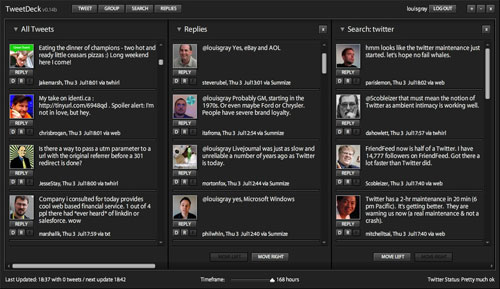
For many, given the up and down status of Twitter, the search functionality of Summize has become a must-have to find conversations, replies, and topics. A new AIR app, debuting today, called TweetDeck, features full integration with Summize, and lets you customize your Twitter experience, through dedicated columns for your feed, your replies, searches, and even the ability to create custom groups of those you follow on Twitter for a micro-feed.

Authored by Iain Dodsworth, TweetDeck (available here), could give other AIR options, like Twhirl and Feedalizer some new competition. While I'm not typically a huge fan of AIR apps, I found TweetDeck to offer a great number of customizations that have me keeping it open and on the desktop around the clock.


The TweetDeck Interface (Click for Larger Image)

TweetDeck offers four major columns in which to organize Twitter data: "All Tweets", essentially your friends' timeline, "Replies", showing replies to you, the equivalent of Twitter's replies tab, "Search", which will keep a running search window open for a term you've selected, and "Group", which lets you make a sub-set of those you follow on Twitter, and make a miniature timeline.

Unlike some applications, whose preferred mode is single column, getting me only my Twitter stream, TweetDeck is actually very well built for being used in full-screen mode, of course, running in the background. Now, with one glance, I can see all updates, see all replies, and keep my eye out for keywords. And rather than force me to go out to Summize to search a keyword, TweetDeck has integrated Summize's search capability and also its ability to find replies, although, in version 0.15 beta, released just this morning, Twitter replies now have precedence, should there be duplicates.

You can also, of course, post your own Tweets from within the app, just by hitting the "Tweet" button at the top and entering what you want to say. TweetDeck counts down the number of characters to make sure you don't exceed 140.

The recent strain at Twitter has resulted in the service reducing the number of API calls developers can make to get Twitter updates, and there, TweetDeck has you covered as well, so you learn if there's any slowness, where to lay the blame.

In the bottom right corner, TweetDeck reports: "Twitter Status: Pretty much ok" or "Twitter Status: Rate limit exceeded" when there's a problem. It also provides a status as to when it was last updated, how many tweets were received, and when the next update is expected, polling every couple minutes.

In addition to the integrated search functionality, I was most impressed by the grouping function. I was able to create a group called "Lady Digerati", and could hand-pick which Tweeters would be followed, including @corvida, @sarahintampa, @veronica, @TheMacMommy, @NicoleSimon and others. You could, of course, make your own sub-groups to get a different subset.

While Jesse Stay and others have said Twitter's major issues have decimated the developer community's efforts around Twitter, there are still some looking to innovate, TweetDeck being a good example. Of course, given it's early status, there might be some issues, but it's worth taking a look, as the application has some great potential.